← All 50 books
Book 43 of 50 · Free
Workflow Automation with APIs
26,838 words · 17 chapters · illustrated
Book 43 of 50 · Free
26,838 words · 17 chapters · illustrated
Book 43 of 50 — AstolixGen Learning Series (Detailed Edition) For researcher and publication students
Modern research runs on software. Literature searches, data collection, manuscript tracking, citation management, conference alerts, survey collection, and collaboration all happen inside web applications — and almost every one of those applications exposes an API, a doorway that lets your own programs talk to it directly. Learning to use APIs turns repetitive, click-by-click research chores into small automated workflows that run while you sleep: a script that checks every morning whether new papers cite your work, a form that feeds survey responses straight into your analysis spreadsheet, or a pipeline that downloads, cleans, and archives datasets with a single command. This book teaches you the complete skill chain — what APIs are, how REST works, how authentication protects them, how to call them from Python, how to connect services with webhooks, how to chain multi-step workflows, how to handle errors and rate limits, how to schedule and monitor jobs, how to transform data between systems, how to keep everything secure, and finally how to assemble all of it into one production-ready automated workflow. You do not need a computer science degree; you need basic Python familiarity and the willingness to read documentation carefully.
By the end of this book, you will be able to:
requests library to query scholarly APIs (such as Crossref, OpenAlex, and arXiv) and collect publication data programmatically.| Chapter | Guiding Question | Key Takeaway |
|---|---|---|
| 1. What Are APIs? A Practical Introduction | What is an API, really, and why should a researcher care? | An API is a machine-readable doorway into software; it lets you automate anything you can already do by clicking. |
| 2. REST Fundamentals: Requests, Responses, and Status Codes | How do I ask a web service for data and understand its answer? | Every interaction is a request with a method, URL, headers, and body — and a response with a status code and payload. |
| 3. Authentication: API Keys, Tokens, and OAuth | How do I prove who I am without leaking secrets? | Use the weakest credential that works, keep secrets out of code, and let OAuth handle delegated access. |
| 4. Python requests in Practice | How do I actually call an API from Python? | The requests library plus JSON parsing covers 90% of research automation needs. |
| 5. Webhooks: Letting Services Talk to You | How do services notify my code when something happens? | Webhooks push events to you; verify signatures and always respond fast. |
| 6. Chaining Services into Multi-Step Workflows | How do I connect several apps into one pipeline? | Break the workflow into trigger → steps → result, with clear data handoffs at each boundary. |
| 7. No-Code and Low-Code Automation Platforms | When should I click instead of code? | No-code platforms are fastest for simple glue work; code wins for scale, cost, and control. |
| 8. Error Handling, Retries, and Rate Limits | What do I do when an API fails, throttles, or paginates? | Treat failure as normal: retry with backoff, respect rate limits, and page through results completely. |
| 9. Scheduling and Monitoring Your Automations | How do I run jobs automatically and know they're healthy? | Schedule with cron or a managed scheduler, log everything, and alert on silence. |
| 10. Mapping and Transforming Data Between Systems | How do I make data from system A fit system B? | Write explicit mapping functions; never trust field names, formats, or identifiers to match. |
| 11. Security Best Practices for API Automation | How do I keep credentials and data safe? | Secrets in a vault, least privilege everywhere, HTTPS always, and an audit trail of what ran. |
| 12. Capstone: Building a Complete Automated Workflow | Can I put it all together into one real project? | A documented, scheduled, monitored citation-and-dataset pipeline you can adapt to your own thesis. |
| Tool | What It Does | When to Use It |
|---|---|---|
Python requests |
Sends HTTP requests and reads responses in Python | Your default tool for calling any REST API from code |
jq / Python json |
Parses and inspects JSON payloads | Debugging responses and extracting fields |
| cURL | Makes raw HTTP requests from the terminal | Quick experiments and testing endpoints |
| Postman / Insomnia | Visual API client for building and saving requests | Exploring a new API before writing code |
Environment variables / .env |
Keeps secrets out of source code | Always — for every API key and token |
| Git + GitHub | Versions your automation scripts | Any script you will run more than once |
| cron / Task Scheduler | Runs scripts on a schedule | Daily/weekly recurring research jobs |
| Zapier / Make / n8n | No-code workflow automation across apps | Simple cross-app glue, especially non-technical teams |
| Webhook receiver (Flask/FastAPI) | Accepts incoming event notifications | Reacting to events in real time |
Logging (logging module) |
Records what your automation did | Every scheduled or unattended job |
| pandas | Cleans and reshapes tabular API data | Turning API results into analysis-ready datasets |
| OAuth 2.0 | Delegated, scoped authorization standard | When an API acts on a user's behalf |
| Book Part | How It Helps a Researcher's Workflow |
|---|---|
| Chapters 1–2 (API & REST basics) | Read and query scholarly APIs (Crossref, OpenAlex, ORCID, arXiv) for literature discovery and bibliometric data |
| Chapter 3 (Authentication) | Register for API access safely — email-to-token flows for publishers, OAuth for ORCID/Google Scholar integrations |
| Chapter 4 (Python requests) | Build your first data-collection scripts: harvest metadata, abstracts, citations for systematic reviews |
| Chapters 5–6 (Webhooks & chaining) | React to events: new citations, form submissions, dataset updates — and chain collection → cleaning → storage |
| Chapter 7 (No-code platforms) | Automate admin chores (application tracking, alerts, spreadsheet sync) without writing code |
| Chapters 8–9 (Errors, scheduling, monitoring) | Run long, unattended harvests (e.g., weekly literature scans) that survive failures and report their own health |
| Chapter 10 (Data mapping) | Merge records from multiple databases (Scopus-style exports, Crossref, institutional repositories) into one clean dataset |
| Chapter 11 (Security) | Protect credentials in shared labs and avoid leaking keys in theses, repos, or screenshots |
| Chapter 12 (Capstone) | Produce a documented, reproducible pipeline suitable for a methods section or a lab handoff |
Imagine you are at a restaurant. You do not walk into the kitchen, open the fridge, and cook your own meal. You look at the menu, tell the waiter what you want, and the kitchen does the work and delivers the result. An API — Application Programming Interface — is the waiter. It is a defined menu of requests you can make to a piece of software, and it returns the results in a format your own programs can use. The kitchen (the application's internal code and database) stays hidden; you only interact through the agreed interface.
Now replace the restaurant with a research database. Every day you visit publisher websites, search Google Scholar, check who cited your paper, download datasets, and copy metadata into spreadsheets — all through the "dining room," the graphical user interface. But those same services also run a "waiter's counter" for programs: a URL you can call from a Python script that returns the same information as structured data, in seconds, for thousands of records at once. That is what this book is about: moving from the dining room to the waiter's counter, so that repetitive research work becomes small programs instead of long afternoons.
Every modern application has two faces. The first is the human face: buttons, forms, and pages designed for eyes and clicks. The second is the programmatic face: the API, designed for other software to call. They usually reach the same underlying data and functions. When you search for papers on a publisher's website, the page you see was assembled from the same data that the publisher's API would hand your script directly. The difference is that the human face returns a web page styled for reading, while the API returns raw structured data — typically JSON — styled for processing.
Why does this matter for you? Because structured data is computable. A list of 2,000 paper titles in a spreadsheet is useful; the same 2,000 records as JSON — with authors, dates, DOIs, citation counts, and abstracts attached in predictable fields — can be filtered, counted, merged, and analyzed automatically. APIs are the bridge between "the web has this information" and "my program can work with this information."
At its simplest, calling a web API means sending a message to a URL and getting a message back. Consider OpenAlex, a free and open index of the world's scholarly works. If you open this URL in a browser — https://api.openalex.org/works?search=machine+learning — you will see a page of JSON: a structured list of scholarly works about machine learning. That URL is an API call. Your browser made it, the server answered, and what came back was data, not a designed page.
A Python script does exactly the same thing, except it can then loop over the results, extract fields, save them to a file, and repeat the process for a hundred queries:
import requests

response = requests.get("https://api.openalex.org/works?search=machine+learning")
data = response.json()
print("Total works found:", data["meta"]["count"])
for work in data["results"][:5]:
    print("-", work["title"])
That five-line program replaces minutes of manual searching, copying, and pasting — and it runs the same way every time, which means it is reproducible. Reproducibility is not a side benefit for researchers; it is the point. When your literature search is a script, anyone can run it, audit it, and get the same dataset.
Not every API works the way OpenAlex's does. The most common family, and the focus of this book, is REST (Representational State Transfer): APIs that use ordinary web addresses (URLs) and the standard vocabulary of the web — GET to read, POST to create, PUT/PATCH to update, DELETE to remove. REST is the style described in Roy Fielding's doctoral dissertation [1], and it dominates research and web tooling because it is simple, stateless, and works with any programming language.
You will also encounter three other families. SOAP is an older, stricter style built on XML envelopes and formal contracts; some institutional and government systems (library catalogues, university administration portals) still expose SOAP endpoints, and you may have to call one when integrating with legacy campus software. GraphQL is a newer query language that lets the client ask for exactly the fields it wants in a single request; GitHub's API, for example, offers both REST and GraphQL, and GraphQL shines when you need deeply nested data without making dozens of requests. Finally, language libraries and SDKs (software development kits) are not network APIs at all — they are packages you install, like Python's pandas or a publisher's official Python client, which wrap the network calls in friendly functions. Underneath, most SDKs are still talking to a REST API; they just hide the HTTP details.
For this book, REST is the foundation because it is universal: if you understand REST, you can read any REST API's documentation and start working within an hour, and the mental model transfers to GraphQL and webhooks.
Every web API interaction has four ingredients on the way out and three on the way back. On the way out: the method (what you want to do: GET, POST, …), the URL (which resource you want: which papers, which dataset, which record), the headers (metadata about your request: who you are, what format you accept), and the body (the data you are sending, for requests that create or update things). On the way back: the status code (a number saying what happened: 200 for success, 404 for not found, 429 for too many requests), the headers (metadata about the response), and the body (the data itself, usually JSON).
You already know this pattern from everyday browsing — every click in your browser sends exactly such a request. APIs simply let your programs send those requests on purpose, in bulk, and on a schedule.
The scholarly world is unusually generous with APIs, which makes it the perfect training ground:
api.crossref.org) — metadata for tens of millions of published works with DOIs: titles, authors, journals, dates, references, funding. Free, no key required for polite use.api.openalex.org) — an open catalogue of works, authors, venues, institutions, and citation links, designed as a free alternative to commercial bibliometric databases.orcid.org) — researcher identity records; its public API lets you look up a researcher's profile and works by ORCID iD.export.arxiv.org) — the preprint server's API for searching papers by topic, author, or date range.zenodo.org/api) — CERN's open research repository; its API lets you search and deposit datasets and software.api.github.com) — repositories, issues, and releases; useful for research software engineering and for archiving code with releases.You do not need accounts or keys for the basic read operations of most of these, which means you can start experimenting in the next chapter with zero setup. When you later need to write data (deposit a dataset, update a profile), authentication enters the picture — that is Chapter 3.
A tempting alternative to APIs is web scraping: writing a program that downloads human web pages and extracts data from the HTML. Scraping works, but it is fragile and often against a site's terms of service. Page layouts change without warning, breaking your extractor; aggressive scraping can get your IP address blocked; and many publishers explicitly permit API access while forbidding scraping. The professional rule is simple: if an API exists, use the API. It is the supported, stable, documented doorway. Reserve scraping for the rare case where no API exists, keep it gentle (slow request rates, respect robots.txt), and check the terms of use first.
One API call is a tool; many calls arranged in a sequence is a workflow; and a workflow that runs on its own is automation. The progression this book follows looks like this:
Most researchers live at stage 1. The goal of this book is to move you to stage 4 for the repetitive parts of your work — literature monitoring, data harvesting, metadata cleaning, reporting — while keeping you firmly in control of the intellectual parts: what to search, what counts as evidence, and what the results mean.
Every API ships with documentation, and learning to read it quickly is a meta-skill that pays off for every API you will ever touch. Good documentation follows a predictable anatomy. The overview or quickstart tells you the base URL (the part all endpoints share, e.g. https://api.openalex.org) and shows one working example — run that example first, before reading anything else, so you have a known-good baseline. The authentication section explains which credential scheme the API uses and how to obtain one; read this before you design anything, because it determines how your code will be structured. The endpoint reference lists each URL, its supported methods, and its parameters — this is the menu from Chapter 1's restaurant analogy, and you will return to it constantly. The errors section documents status codes and error-body formats specific to this API. The rate limits section states your quotas. Finally, the changelog tells you what changed recently — check it whenever old code mysteriously breaks.
Two practical habits accelerate everything. First, find the base URL and the versioning scheme immediately: some APIs version in the path (/v1/works), others in a header. Knowing this prevents the classic beginner error of mixing examples from different API versions. Second, test in the shallow end: before writing a script, paste a simple GET URL into your browser or run it with curl. If the raw request works, any failure in your code is in your code — a powerful debugging bisection that saves hours.
A final note on JSON, the data format nearly all these APIs speak [5]. JSON has only a few building blocks: objects ({"key": "value"}), arrays ([1, 2, 3]), strings, numbers, booleans, and null. In Python, response.json() converts JSON objects to dictionaries and JSON arrays to lists — the mapping is one-to-one, which is why navigating API responses feels like navigating nested Python dicts. When documentation shows an "example response," read it as a map of the keys your code can rely on, and cross-check with a live response, because documentation examples sometimes lag behind the real API.
For your research: Pick one repetitive task you did this month — checking citations, downloading papers' metadata for a review, or copying survey results into a spreadsheet. Write down the exact steps. That list is your first automation candidate; by Chapter 6 you will be able to sketch it as a workflow, and by Chapter 12 you will build it. Keep the list handy as you read.
Key takeaways: - An API is a program-to-program interface: a defined menu of requests a software system accepts, returning structured data instead of web pages. - REST APIs use URLs, HTTP methods, and JSON; they are the most common style and the foundation of this book. - Scholarly APIs (Crossref, OpenAlex, ORCID, arXiv, Zenodo) are free, keyless for reading, and ideal for learning and for real bibliometric work. - Structured API data is computable and reproducible — a script that fetches data can be rerun, audited, and shared. - Prefer APIs over web scraping: APIs are the supported, stable, documented path. - Automation is a ladder: single calls → chained workflows → scheduled, self-monitoring pipelines.
REST is not a standard you download or a library you install. It is an architectural style — a set of conventions for designing web APIs so they are predictable, scalable, and easy to learn. It was described by Roy Fielding in his 2000 doctoral dissertation on network-based software architectures [1], and although the academic language is dense, the practical rules are few and intuitive. This chapter teaches you those rules as working knowledge: how to read a request, how to read a response, and what the numbers coming back actually mean.
The central idea of REST is the resource: any meaningful thing the API manages — a paper, an author, a dataset, a user profile, a deposit — gets its own URL, called its endpoint. You interact with the thing by sending HTTP requests to its address. A well-designed API reads almost like a sentence:
GET https://api.openalex.org/works/W2741809807 — "give me the work with this ID"GET https://api.openalex.org/authors/A5023888391 — "give me this author"GET https://api.openalex.org/works?filter=from_publication_date:2024-01-01 — "give me works published since January 2024"Notice the pattern: nouns, not verbs. The URL names what you want; the HTTP method says what to do with it. This noun-based design is the single most useful habit for reading unfamiliar API documentation: find the nouns (the endpoints), then check which verbs (methods) each one supports.
HTTP defines a handful of methods, and REST APIs use five of them for almost everything:
| Method | Purpose | Example |
|---|---|---|
GET |
Read a resource (never changes anything) | Fetch a paper's metadata |
POST |
Create a new resource | Deposit a dataset on Zenodo |
PUT |
Replace a resource completely | Update a full profile record |
PATCH |
Modify part of a resource | Change just a paper's abstract |
DELETE |
Remove a resource | Delete a draft deposit |
Two properties matter. First, GET is safe: calling it must not change anything on the server, so you can call it freely, repeatedly, and cache the result. Second, PUT and DELETE are idempotent: calling them once or ten times has the same effect. These guarantees are what make automated retries safe — if a GET times out, you can simply send it again without worrying that you created something twice. (For POST, which is not idempotent, retries need more care — see Chapter 8.)
A URL can carry extra instructions after a question mark, as key=value pairs joined by &:
https://api.openalex.org/works?search=climate+adaptation&filter=from_publication_date:2023-01-01&per-page=50
Here search, filter, and per-page are query parameters that narrow the request. Nearly every search-style API uses them, and learning to read an API's parameter list is the fastest way to become productive with it. Common parameter families include search text, filters (date ranges, types, languages), sorting (sort=cited_by_count:desc), and pagination (page=2, per-page=50). Always check the documentation for the exact parameter names — they differ between APIs — and watch for maximum page sizes, which force you to loop through pages (Chapter 8 covers pagination patterns).
Headers are key–value metadata sent alongside the request and response. You will meet a small set constantly:
Authorization — proves who you are (Chapter 3).Accept — the format you want back, e.g. application/json.Content-Type — the format of the body you are sending, e.g. application/json for a POST payload.User-Agent — identifies your client; many scholarly APIs ask you to include a contact email here so they can reach you if your script misbehaves.In Python's requests, headers are just a dictionary:
headers = {
    "Accept": "application/json",
    "User-Agent": "MyThesisBot/1.0 (mailto:you@university.edu)",
}
response = requests.get("https://api.openalex.org/works/W2741809807", headers=headers)
Including a polite User-Agent with your email is good citizenship with free scholarly APIs — and with some of them it puts your requests in a faster, more generous rate-limit pool.
GET requests carry everything in the URL, but POST, PUT, and PATCH usually send a body: the data to create or update. The body is almost always JSON, and the Content-Type: application/json header tells the server how to parse it. A Zenodo-style deposit creation might look like this:
payload = {
    "metadata": {
        "title": "Survey responses, Karachi households 2026",
        "upload_type": "dataset",
        "description": "Anonymized survey data for thesis chapter 4.",
        "creators": [{"name": "Asif, Ali"}],
    }
}
response = requests.post(
    "https://zenodo.org/api/deposit/depositions",
    json=payload,          # requests sets Content-Type and encodes JSON for you
    headers={"Authorization": "Bearer YOUR_TOKEN"},
)
Using the json= argument (rather than manually converting with json.dumps) is a requests convenience: it serializes the dictionary and sets the right header automatically.
Every response has three parts. The status code is a three-digit number summarizing the outcome. The headers describe the response (its format, how many requests you have left before throttling, pagination links). The body carries the payload — usually JSON you parse into a dictionary.
Status codes are grouped by their first digit. You do not need to memorize all of them, but you must recognize the families and the common individuals:
2xx — Success. 200 OK (here is your data), 201 Created (your POST worked; the new resource's URL is usually in the Location header), 202 Accepted (request received, processing asynchronously), 204 No Content (success, nothing to return — typical for DELETE).
3xx — Redirection. 301/302 (moved; follow the Location header). The requests library follows redirects automatically for GET.
4xx — Client error: the request was wrong. 400 Bad Request (malformed syntax or invalid parameters — read the error body, it usually tells you exactly what was wrong), 401 Unauthorized (missing or invalid credentials), 403 Forbidden (credentials valid but you lack permission), 404 Not Found (the resource does not exist — check the URL and ID), 422 Unprocessable Entity (the server understood you, but the data failed validation), 429 Too Many Requests (you are going too fast — slow down; see Chapter 8).
5xx — Server error: the server failed. 500 Internal Server Error (something broke on their side), 502 Bad Gateway, 503 Service Unavailable (try again later), 504 Gateway Timeout. These are usually transient: the correct response is to wait and retry (Chapter 8), not to "fix" your request.
The single most important debugging habit in API work: when a request fails, read the response body. Good APIs return JSON error objects explaining the problem — which parameter was invalid, which field failed validation, what the rate limit is. Beginners stare at the status code; professionals read the message.
response = requests.get("https://api.openalex.org/works/INVALID_ID")
print(response.status_code)   # 404
print(response.json())        # error details: what went wrong and why
Let us put it together with a realistic research task: find the most-cited recent works on a topic and extract their essentials.
import requests

url = "https://api.openalex.org/works"
params = {
    "search": "renewable energy microgrids",
    "filter": "from_publication_date:2023-01-01",
    "sort": "cited_by_count:desc",
    "per-page": 10,
}
headers = {"User-Agent": "ThesisLitReview/1.0 (mailto:student@university.edu)"}

response = requests.get(url, params=params, headers=headers)
response.raise_for_status()          # raises an exception for 4xx/5xx — fail fast, fail loud
data = response.json()

for work in data["results"]:
    title = work.get("title", "No title")
    year = work.get("publication_year")
    cited = work.get("cited_by_count", 0)
    doi = work.get("doi", "no DOI")
    print(f"[{year}] {title} — cited {cited}x — {doi}")
Note three professional touches: params= lets requests encode the query string correctly (spaces, special characters), raise_for_status() converts HTTP errors into Python exceptions so failures cannot pass silently, and .get() with defaults guards against missing fields — APIs evolve, and a field present today may be absent tomorrow.
Fielding's dissertation [1] defines REST through constraints; three are worth knowing by name because API documentation assumes them. Statelessness means each request carries everything the server needs — the server remembers nothing between your calls, which is why you send your credentials with every request (Chapter 3). Uniform interface means resources, methods, and representations work the same way across the whole API, so learning one endpoint teaches you the pattern for all of them. Cacheability means responses can declare themselves reusable, which is why repeated GETs are cheap and safe. You do not need the full theory — but when documentation says "this API is stateless," you now know it means: no login sessions, send auth every time.
URLs look simple until your query contains a space, an ampersand, or a non-English character — then URL encoding matters. Certain characters are reserved in URLs (?, &, =, /, spaces), so they must be percent-encoded (%20 for space, %26 for &). This is why Chapter 2 used params={...} instead of hand-building query strings: requests encodes everything correctly, including Urdu or Arabic search terms, which would otherwise corrupt the request or silently change its meaning. If you ever must build a URL manually, use urllib.parse.quote — never string concatenation with raw user input.
Two more HTTP features are worth knowing. Content negotiation is the mechanism behind the Accept header: the client declares which representation it wants (application/json, application/xml, sometimes even text/csv), and the server responds accordingly. Some scholarly APIs serve citations in multiple formats from the same endpoint — asking for BibTeX instead of JSON can be a one-header change. And beyond the big five methods, two minor ones occasionally help: HEAD (like GET but returns headers only — a cheap way to check whether a resource exists or how large it is) and OPTIONS (asks the server which methods an endpoint supports — useful when exploring an unfamiliar API).
Finally, develop the habit of sending a request identifier on non-trivial calls — many APIs accept or generate one (returned as something like X-Request-Id). When something fails and you contact support, quoting the request ID lets them find your exact call in their logs. It costs one header and can save days of back-and-forth.
Let's apply the documentation-reading skill to a real example: the Crossref REST API, which provides metadata for works with DOIs. Its documentation follows the anatomy from the previous section. The base URL is https://api.crossref.org, and the central resource is the work: GET /works/{doi} returns one work's metadata, while GET /works searches and filters the whole collection. The endpoint reference lists query parameters you'll recognize immediately: query (free-text search), filter (structured constraints like from-pub-date:2023-01-01), rows (page size), offset (page position), sort and order, and select (limit which fields come back — a simple form of the field-selection idea behind GraphQL).
Two Crossref-specific conventions are worth noticing because they generalize. First, the API asks you to identify yourself with a mailto parameter or User-Agent header containing your email — in return, your requests join a faster, more generous pool. This "polite pool" pattern appears across free scholarly APIs: identification buys you better service. Second, the response wraps results in a message object containing items (the records) and pagination metadata — every API nests things slightly differently, which is why the first thing you do with a new API is print one full response and map its nesting.
A compact status-code field guide for daily use:
| Code | Meaning | Your response |
|---|---|---|
| 200 | OK | Process the body |
| 201 | Created | Read the Location header for the new URL |
| 400 | Bad request | Read the error body; fix your parameters |
| 401 | Unauthorized | Check credential presence, format, expiry |
| 403 | Forbidden | Check scopes and permissions |
| 404 | Not found | Check the ID/URL; the resource may genuinely not exist |
| 409 | Conflict | Your change collides with existing state; fetch, reconcile, retry |
| 422 | Unprocessable | Data failed validation; read the field-level errors |
| 429 | Too many requests | Back off; honor Retry-After |
| 500/502/503 | Server trouble | Retry with backoff; it's their problem, not yours |
Tape this table near your desk until the families feel automatic.
For your research: Open your browser and try the OpenAlex and Crossref URLs from this chapter by hand. Change the search terms to your thesis topic and add a date filter. Watch how the JSON is organized:
resultsarrays,metacounts, nestedauthorships. Understanding that structure by sight makes every script you write later dramatically easier, because you will know exactly which keys to extract.
Key takeaways:
- REST models everything as a resource with a URL; the HTTP method (GET, POST, PUT, PATCH, DELETE) says what to do with it.
- Query parameters (?key=value&...) filter, sort, and paginate; headers carry metadata like Authorization, Accept, and User-Agent.
- POST/PUT/PATCH send a JSON body; requests' json= argument handles encoding and the Content-Type header.
- Status codes group by family: 2xx success, 3xx redirect, 4xx your mistake, 5xx their problem; 429 means slow down.
- Always read the error body — it usually names the exact problem.
- raise_for_status() plus .get() with defaults makes scripts fail loudly on errors and tolerate missing fields.
Reading public data is the friendly on-ramp, but real workflows also write: depositing datasets, updating profiles, posting to project channels, or accessing your own private data. Every such action requires the API to answer two questions: who are you (authentication) and are you allowed to do this (authorization). This chapter covers the credential systems you will actually encounter, from simplest to most robust, and the non-negotiable habits for handling secrets.
An open read API like OpenAlex can serve anyone because reading public metadata harms no one. But an endpoint that deposits a dataset under your name, spends your quota, or reads your private messages must verify identity — otherwise anyone could impersonate you. Authentication also lets providers enforce rate limits per user (fair sharing of a free service), billing (paid tiers), and audit trails (who changed what, when). Expect every write operation and every access to non-public data to require credentials.
An API key is a long random string the service issues to you, acting as both identifier and password. You typically send it in a header or query parameter:
headers = {"X-API-Key": "sk_live_abc123..."}          # header style
# or
params = {"api_key": "abc123..."}                      # query-parameter style
Keys are simple and common (Semantic Scholar, many publisher APIs, and countless SaaS tools use them). Their weakness is that they are bearer credentials with no expiry and broad power: anyone holding the key has your full access, and keys often live forever until manually revoked. Treat a key like a password: never hard-code it, never share it, and regenerate it the moment you suspect exposure.
A bearer token works like an API key — whoever bears it is accepted — but it is typically short-lived (minutes to hours) and scoped to specific permissions. You send it in the standard Authorization header:
headers = {"Authorization": "Bearer eyJhbGciOi..."}
response = requests.get("https://api.example.org/v1/profile", headers=headers)
Tokens are issued by a login step: you present long-lived credentials once, receive a short-lived token, and use the token for subsequent calls. When it expires, you request a fresh one. This design limits damage — a leaked token dies within the hour — and it is the mechanism underneath OAuth (below) and most modern APIs, including Zenodo's personal access tokens and the GitHub API's fine-grained tokens.
HTTP Basic authentication sends a username and password encoded (not encrypted — merely base64-encoded) in the Authorization header. It is only safe over HTTPS, which encrypts the whole connection. You will still meet it in university systems, mail servers, and some legacy APIs:
response = requests.get(url, auth=("username", "password"))
requests handles the encoding for you. Rule of thumb: if a service offers tokens or keys, prefer them; use Basic auth only when it is the documented option, and never over plain http://.
The most important system to understand is OAuth 2.0, the industry standard for delegated authorization, specified in RFC 6749 [4]. The problem it solves: you want an application (say, a reference manager) to access your ORCID record or your cloud storage on your behalf, without giving it your password. OAuth solves this with a choreographed handoff between four parties: the resource owner (you), the client (the app), the authorization server (ORCID's login system), and the resource server (the API holding your data).
The most common flow, the authorization code flow, works like this:
Authorization: Bearer ...).Scopes are the key security idea: instead of all-or-nothing access, you grant exactly the permissions the app needs. When you connect ORCID to a manuscript system and it asks for "read your ORCID record and add works," those are scopes — and you should be suspicious of any app requesting scopes beyond its job.
For server-to-server automation with no human present, OAuth offers the client credentials flow: your script authenticates with its own client ID and secret and receives a token directly. Many institutional APIs support this for backend jobs.
In practice, you rarely implement OAuth by hand — libraries like requests-oauthlib or authlib manage the flows — but you must understand the model to register applications, choose scopes, and debug the inevitable redirect and token errors. A concrete research example: ORCID's member API uses OAuth so that universities and publishers can read and update researcher profiles only with each researcher's explicit, scoped consent.
However you authenticate, the credential itself must be protected. These rules are non-negotiable:
python
   import os
token = os.environ["ZENODO_TOKEN"] # fails loudly if missing — good.env file for local development (loaded with the python-dotenv package), and add .env to .gitignore on the first day of the project. A secret committed to Git is compromised forever — even if you delete it later, it lives in history.A minimal safe pattern for a research script:
import os
import requests
from dotenv import load_dotenv

load_dotenv()                                    # reads .env into environment (dev only)
token = os.environ.get("OPENALEX_EMAIL")         # or a real token variable
if not token:
    raise SystemExit("Set OPENALEX_EMAIL in your .env file first.")

headers = {
    "Authorization": f"Bearer {os.environ['RESEARCH_API_TOKEN']}",
    "User-Agent": f"ThesisBot/1.0 (mailto:{token})",
}
401 Unauthorized means the credential is missing, malformed, or expired: check the header format (Bearer prefix, no extra spaces), check expiry, and re-issue. 403 Forbidden means the credential is valid but lacks permission: check scopes, check that the token was granted access to that resource, and check whether the key is restricted by IP or referrer. When debugging, print everything except the secret — log that a token was present and its first few characters at most. Full tokens in logs are a classic leak vector (Chapter 11).
Many modern APIs issue tokens in a format called JWT (JSON Web Token), standardized in RFC 7519 [9]. A JWT is three base64-encoded segments joined by dots — header.payload.signature — and you can paste one into a decoder to inspect it (never paste a real secret token into a random website; decode locally or not at all). The payload carries claims: who the token was issued to (sub), who issued it (iss), when it expires (exp), and what it may do (scope). The signature lets the API verify the token wasn't tampered with, without calling back to the authorization server each time. Understanding this demystifies expiry errors: when a call fails with 401 after working for an hour, check the token's exp claim — it probably just expired, and the fix is a refresh, not a bug hunt.
The refresh flow is how long-running automation stays authenticated without human logins. Alongside the short-lived access token, OAuth issues a longer-lived refresh token; your script trades the refresh token for a new access token whenever the old one expires:
def refresh_access_token():
    r = requests.post("https://auth.example.org/oauth/token", data={
        "grant_type": "refresh_token",
        "refresh_token": os.environ["OAUTH_REFRESH_TOKEN"],
        "client_id": os.environ["OAUTH_CLIENT_ID"],
        "client_secret": os.environ["OAUTH_CLIENT_SECRET"],
    }, timeout=15)
    r.raise_for_status()
    tokens = r.json()
    return tokens["access_token"], tokens.get("refresh_token")
Note that refresh tokens can themselves rotate (the response may include a new refresh token replacing the old one) — your code must persist the latest one. For scheduled jobs, store tokens in a small state file or secret store and refresh lazily: attempt the API call, and only on a 401, refresh and retry once. This "try, then refresh on 401" pattern handles expiry robustly without complicating the happy path.
One more scenario: service accounts and machine users. When automation belongs to a lab rather than a person, create a dedicated account (or use the provider's service-account feature) instead of minting tokens from your personal login. Personal tokens inherit your personal access and break when you change your password or leave; service identities survive personnel changes and make audit logs meaningful ("the harvester did this" rather than "Asif did this at 3am").
Real projects rarely use one scheme — they combine several, each where it fits. A typical research automation stack might use: an API key for a publisher's metadata API (simple, read-only), a bearer token from OAuth for writing to a cloud spreadsheet on the lab's behalf (scoped, expiring), and HTTP Basic for the university's legacy library catalogue (the only option its ancient endpoint offers). The skill is matching the scheme to the situation: prefer tokens over keys where both exist, prefer OAuth over shared secrets when acting for other people, and accept Basic auth only over HTTPS when nothing better is offered.
Manage this multiplicity with one secrets file per environment. Your laptop's .env holds development keys; the lab server holds production keys with different values; the scheduled job reads from the secret store of whatever runs it. The code never changes — only the environment does:
# .env.example (committed to git — names only, never values)
RESEARCH_API_TOKEN=
PUBLISHER_API_KEY=
CONTACT_EMAIL=
SMTP_USER=
SMTP_PASS=
OAUTH_CLIENT_ID=
OAUTH_CLIENT_SECRET=
OAUTH_REFRESH_TOKEN=
# .gitignore (committed from day one)
.env
*.log
state/
__pycache__/
A new collaborator copies .env.example to .env, fills in their own keys, and the project runs — no code edits, no secrets in chat. When someone leaves the project, you revoke their keys without touching anyone else's. This separation of code, configuration, and credentials is one of the oldest professional practices in software, and automation projects need it just as much as web applications do.
For your research: Create a free account on one service you will actually use — Zenodo, ORCID, or GitHub — and generate a personal access token with the narrowest scope that fits a read-only experiment. Store it in a
.envfile, load it withpython-dotenv, and make one authenticated request. Then deliberately revoke the token and watch the request fail with401. That ten-minute exercise teaches more about credential lifecycle than any lecture.
Key takeaways:
- Authentication answers "who are you"; authorization answers "may you do this" — APIs need both for writes and private data.
- API keys are simple but long-lived and powerful: guard them like passwords.
- Bearer tokens are short-lived and scoped; they are the modern default, sent as Authorization: Bearer ....
- OAuth 2.0 [4] lets apps act on your behalf with explicit, scoped consent — without ever seeing your password.
- Secrets live in environment variables or a vault, never in code, repos, or screenshots; revoke and rotate on any suspicion of exposure.
- 401 = bad/missing credential; 403 = valid credential, insufficient permission.
Theory becomes skill at the keyboard. This chapter is a hands-on tour of Python's requests library — the de facto standard for calling HTTP APIs from Python — built around realistic research tasks: searching scholarly APIs, downloading records, handling JSON, and saving results for analysis. If you can work through this chapter comfortably, you can automate against any documented REST API.
requests is not in the standard library, so install it once per Python environment:
pip install requests python-dotenv pandas
(python-dotenv manages secrets as shown in Chapter 3; pandas [2] will turn API results into dataframes later.) Verify with the smallest possible program — a GET request to OpenAlex:
import requests

response = requests.get("https://api.openalex.org/works/W2741809807")
print(response.status_code)   # expect 200
print(response.json()["title"])
If that prints a title, your toolchain works. Everything else in this chapter is elaboration on this pattern.
Real queries need parameters and headers, and every request needs a timeout. Without one, a hung server can freeze your script forever; with one, the failure becomes a catchable exception:
import requests

url = "https://api.openalex.org/works"
params = {"search": "solar desalination", "per-page": 25}
headers = {"User-Agent": "ThesisBot/1.0 (mailto:you@university.edu)"}

try:
    response = requests.get(url, params=params, headers=headers, timeout=15)
    response.raise_for_status()
except requests.exceptions.Timeout:
    print("The server took too long — will retry later.")
except requests.exceptions.HTTPError as e:
    print("HTTP error:", e)
except requests.exceptions.RequestException as e:
    print("Network problem:", e)
else:
    data = response.json()
    print(f"Found {data['meta']['count']} works; showing {len(data['results'])}")
requests.exceptions.RequestException is the base class of all requests errors — catching it is your safety net. timeout=15 means "give up if the server takes longer than 15 seconds," which keeps scheduled jobs from hanging indefinitely (Chapter 9).
API responses are nested dictionaries and lists. The skill is navigating them defensively, because real data is messy: fields go missing, lists come back empty, types surprise you. Three habits keep you safe:
work = data["results"][0]

title   = work.get("title") or "Untitled"                       # missing or None-safe
year    = work.get("publication_year")
doi     = (work.get("doi") or "").replace("https://doi.org/", "")
journal = (work.get("primary_location") or {}).get("source", {}).get("display_name")
authors = [a["author"]["display_name"]
           for a in work.get("authorships", [])
           if a.get("author")]
Note the pattern: .get() with defaults, or {} to survive None nested objects, and list comprehensions guarded by if. Defensive parsing is not pessimism — it is what lets a 10,000-record harvest finish instead of crashing on record 7,341 because one paper has no journal.
Writing follows the same shape with json= for the body. Here is a realistic example: submitting a new item to a (hypothetical but typical) lab inventory API:
import os
import requests

payload = {
    "sample_id": "soil-khi-0142",
    "location": {"lat": 24.8607, "lon": 67.0011},
    "ph": 7.4,
    "collected_by": "field-team-a",
    "notes": "Monsoon season sample",
}
headers = {"Authorization": f"Bearer {os.environ['LAB_API_TOKEN']}"}

response = requests.post(
    "https://api.lab.example.org/v1/samples",
    json=payload,
    headers=headers,
    timeout=15,
)
response.raise_for_status()
created = response.json()
print("Created:", created["id"], "— view at", response.headers.get("Location"))
The 201 Created status plus a Location header pointing at the new resource is the REST convention for successful creation — check for it when testing write endpoints.
When a script makes many requests to the same API, a requests.Session reuses the underlying connection (faster) and persists headers and auth across calls (cleaner):
session = requests.Session()
session.headers.update({
    "User-Agent": "ThesisBot/1.0 (mailto:you@university.edu)",
    "Authorization": f"Bearer {os.environ['RESEARCH_API_TOKEN']}",
})

for doi in doi_list:
    r = session.get(f"https://api.crossref.org/works/{doi}", timeout=15)
    r.raise_for_status()
    store(r.json()["message"])
Sessions also manage cookies automatically, which matters for APIs that use cookie-based sessions. One caution: a session keeps one configuration, so use separate sessions for different APIs or credential sets.
APIs never return a million records at once; they return pages. A complete harvest loops through pages until the API says there are no more. OpenAlex-style pagination uses page and per-page; Crossref uses cursor-based paging. The robust generic pattern:
import time

all_works = []
page = 1
while True:
    r = session.get(url, params={**params, "page": page, "per-page": 100}, timeout=15)
    r.raise_for_status()
    batch = r.json()["results"]
    if not batch:                       # empty page => done
        break
    all_works.extend(batch)
    print(f"Page {page}: {len(batch)} records (total {len(all_works)})")
    page += 1
    time.sleep(0.5)                     # be polite: don't hammer a free service
The time.sleep(0.5) is deliberate courtesy — and often a requirement. Free scholarly APIs survive on goodwill; a script firing ten requests per second is how researchers get their institutions' IP ranges throttled. Polite harvesting (pauses between requests, off-peak hours, a contact email in User-Agent) is both ethics and self-interest: Chapter 8 formalizes this as rate-limit handling.
Some APIs paginate with cursors (an opaque token marking your position) instead of page numbers. The logic is identical — loop, passing back the cursor each response gives you — but cursors are more reliable for large result sets because page numbers can shift as the underlying data changes mid-harvest.
Collecting data is only half the job; the other half is analyzing it. The pandas library [2] turns a list of record dictionaries into a dataframe in one line:
import pandas as pd

rows = []
for w in all_works:
    rows.append({
        "title": w.get("title"),
        "year": w.get("publication_year"),
        "doi": w.get("doi"),
        "cited_by": w.get("cited_by_count", 0),
        "journal": (w.get("primary_location") or {}).get("source", {}).get("display_name"),
        "open_access": (w.get("open_access") or {}).get("is_oa"),
    })

df = pd.DataFrame(rows)
df.to_csv("literature_corpus.csv", index=False)
print(df.groupby("year")["cited_by"].mean().round(1))   # mean citations per year
This is the moment API automation pays off visibly: a few dozen lines produce a clean, timestamped, reproducible dataset — the raw material for the bibliometric charts in your thesis — instead of a week of manual copying. Save the raw JSON too (json.dump(all_works, open("raw.json","w"))): raw responses are your audit trail if a reviewer ever asks how a number was derived.
When a request misbehaves, inspect what was actually sent. requests exposes the prepared request:
r = session.get(url, params=params)
print("Final URL:", r.request.url)          # check encoding of parameters
print("Sent headers:", r.request.headers)   # is Authorization present and correct?
print("Status:", r.status_code)
print("Response (first 500 chars):", r.text[:500])
For deeper inspection, tools like Postman or Insomnia let you build the same request visually, and browser developer tools (F12 → Network tab) show you the exact requests a website makes — a legitimate way to discover undocumented endpoints, though you should still prefer documented APIs. When asking for help (a forum, a supervisor, documentation support), include the status code, the error body, and the request shape — but redact the credential.
requests toolkitReal workflows move files, not just JSON. Uploading a file uses multipart encoding, which requests handles with the files argument:
with open("dataset.csv", "rb") as f:
    r = session.post(url, files={"file": ("dataset.csv", f, "text/csv")},
                     data={"title": "Field survey 2026"}, timeout=60)
r.raise_for_status()
Downloading large files needs streaming, otherwise a multi-gigabyte dataset loads entirely into memory and crashes the script:
r = session.get("https://example.org/data/big-dataset.zip", stream=True, timeout=30)
r.raise_for_status()
with open("big-dataset.zip", "wb") as f:
    for chunk in r.iter_content(chunk_size=1024 * 1024):   # 1 MB at a time
        f.write(chunk)
Always stream downloads you didn't size in advance — "the file is probably small" is how out-of-memory crashes happen at 2am.
The remaining methods follow the same patterns as GET and POST. PUT replaces a resource wholesale (send the complete new representation), PATCH updates fields selectively (send only what changed — and check whether the API expects a merge-patch or a JSON-patch document, because the two formats differ), and DELETE removes. A useful habit for write operations: capture r.elapsed (how long the call took) and r.headers in your logs; when a provider later asks "which of your calls were slow," you have the data.
Two more tools round out the kit. Prepared requests let you inspect or modify the exact bytes about to be sent — handy when debugging authentication edge cases:
req = requests.Request("GET", url, headers=headers, params=params).prepare()
print(req.url, req.headers)     # inspect before sending
r = session.send(req, timeout=15)
And response.links parses RFC-style pagination link headers (rel="next") that some APIs (including GitHub's) use instead of body-embedded cursors — check for it before assuming an API paginates only one way. Between params, json, files, stream, sessions, prepared requests, and links, you now command essentially the entire requests surface that research automation needs.
Here is the Chapter 4 material assembled into one runnable program — the template behind most research harvesting. Read it as a checklist of every habit this book teaches:
# Harvest OpenAlex works on a topic into a CSV. Usage: python harvest.py 'solar desalination'.
import csv, json, sys, time
import requests

QUERY = sys.argv[1] if len(sys.argv) > 1 else "solar desalination"
API = "https://api.openalex.org/works"
HEADERS = {"User-Agent": "ThesisHarvest/1.0 (mailto:you@university.edu)"}

def fetch_page(page):
    r = requests.get(API, params={"search": QUERY, "per-page": 100, "page": page},
                     headers=HEADERS, timeout=20)
    r.raise_for_status()                       # fail fast on HTTP errors
    return r.json()

def flatten(work):
    return {
        "title": (work.get("title") or "").strip(),
        "year": work.get("publication_year"),
        "doi": (work.get("doi") or "").replace("https://doi.org/", ""),
        "cited_by": work.get("cited_by_count", 0),
        "journal": ((work.get("primary_location") or {}).get("source") or {}).get("display_name"),
        "is_oa": ((work.get("open_access") or {}).get("is_oa")),
    }

def main():
    raw, page = [], 1
    while True:                                # paginate to completion
        batch = fetch_page(page).get("results", [])
        if not batch:
            break
        raw.extend(batch)
        print(f"page {page}: {len(batch)} records", flush=True)
        page += 1
        time.sleep(1)                          # polite pace for a free API
    json.dump(raw, open("harvest_raw.json", "w"), ensure_ascii=False)   # audit trail
    with open("harvest.csv", "w", newline="", encoding="utf-8") as f:
        writer = csv.DictWriter(f, fieldnames=["title", "year", "doi", "cited_by", "journal", "is_oa"])
        writer.writeheader()
        writer.writerows(flatten(w) for w in raw)
    print(f"done: {len(raw)} records -> harvest.csv (+ harvest_raw.json)")

if __name__ == "__main__":
    main()
Notice what's absent: no credentials (public read API), no cleverness, no dependencies beyond requests. Every line earns its place: timeout prevents hangs, raise_for_status prevents silent failures, flush=True keeps logs honest during long runs, the raw JSON dump preserves provenance, and UTF-8 is explicit on file writes. When you later add authentication, retries, or scheduling, they slot into this skeleton without restructuring it — good bones matter more than features.
requests mistakes every beginner makes1. Forgetting the timeout. The default is to wait forever. Every request in automation needs timeout= — no exceptions. 2. Not checking the status. A 404 or 500 doesn't raise by itself; without raise_for_status() or an explicit check, your code happily parses an error page as data. 3. Mutating shared params dicts. Reusing one params dict across loop iterations while adding page keys mutates it — copy it ({**params, "page": p}) instead. 4. Assuming JSON. Some endpoints return CSV, XML, or plain text depending on Accept; call r.json() only when the content type says JSON, or wrap it in try/except. 5. Logging the full URL with secrets. If credentials travel in query parameters (some APIs do this), the request URL contains them — never log r.request.url unredacted in that case; prefer header-based auth precisely so URLs stay log-safe. Pin this list to your wall until avoiding all five is reflex.
When a requests call fails, read the traceback bottom-up: the last line names the exception (Timeout, ConnectionError, HTTPError), and the frames above show which line of your code triggered it. A JSONDecodeError on r.json() almost always means the server returned an error page instead of JSON — print r.status_code and r.text[:300] before assuming your parsing is wrong. Build this reflex early: status first, body second, code third.
For your research: Write a script that takes your thesis topic as a search term, harvests the 200 most-cited works from the last five years via OpenAlex, and saves a CSV with title, year, DOI, citation count, journal, and open-access status. Add a one-line summary (total works, mean citations, share open access). This script is a legitimate seed for a systematic review's search-and-screen stage — and a strong artifact for your methods section.
Key takeaways:
- requests.get/post(url, params=..., json=..., headers=..., timeout=...) covers nearly every REST interaction.
- Always set a timeout; catch RequestException so network failures become handled events, not crashes.
- Parse JSON defensively: .get() with defaults, or {} for nested objects, guards on list comprehensions.
- Use Session for repeated calls to one API: faster connections, shared headers and auth.
- Paginate completely (loop until an empty page or cursor exhaustion) and pause politely between requests.
- Bridge to pandas [2] immediately: JSON → dataframe → CSV is the core research data pipeline.
- Debug with r.request.url, sent headers, status code, and error body — with credentials redacted.
Everything so far has been you asking: your script sends a request, the API answers. That pattern — called polling when repeated ("ask every hour whether anything changed") — works, but it is wasteful and slow. You burn requests checking for changes that mostly have not happened, and when something does happen, you learn about it up to an hour late. Webhooks flip the direction: instead of you asking repeatedly, the service calls you the moment an event occurs. If APIs are the waiter taking your order, a webhook is the kitchen bell ringing when your food is ready.
A webhook has three ingredients. First, an event on the provider's side: a form submitted, a payment received, a paper published, a repository pushed to, a sensor reading crossing a threshold. Second, a subscription: you register a URL of yours with the provider and say "notify this address when X happens." Third, your receiver: a small web endpoint you run that accepts the incoming HTTP POST, reads the JSON payload describing the event, and acts on it.
Concretely: you build a form for research participants with a form service; the service offers webhooks; you give it your receiver URL (https://your-server.example.org/hooks/form-submitted); and every time someone submits the form, the service POSTs the answers to your URL within seconds. Your receiver validates the data, appends it to your dataset, and perhaps sends you a notification. No polling, no delay, no wasted requests.
A receiver is just a tiny web server. Flask keeps it to a few lines (install with pip install flask):
from flask import Flask, request, jsonify
import json, datetime

app = Flask(__name__)

@app.route("/hooks/form-submitted", methods=["POST"])
def form_submitted():
    event = request.get_json(force=True)          # the provider's JSON payload
    record = {
        "received_at": datetime.datetime.utcnow().isoformat(),
        "respondent": event.get("respondent_id"),
        "answers": event.get("answers", {}),
    }
    with open("responses.jsonl", "a") as f:      # append-only log: simple, durable
        f.write(json.dumps(record) + "\n")
    return jsonify({"status": "ok"}), 200         # acknowledge FAST (see below)

if __name__ == "__main__":
    app.run(port=5000)
Two design decisions here deserve emphasis. First, the receiver acknowledges immediately (returns 200) and does the minimum work synchronously. Webhook providers retry deliveries they cannot confirm, and slow receivers cause duplicate deliveries and timeouts. The professional pattern is: validate, persist the raw payload, acknowledge, and do heavy processing (cleaning, analysis, notifications) afterwards — in a background job or a queue. Second, the payload is appended to a JSON-lines log before anything else touches it. That log is your insurance: if downstream processing has a bug, you can replay every event from the raw record.
A public URL that accepts POSTs will be found by scanners within hours, so webhook receivers must verify that incoming requests genuinely come from the provider. The standard mechanism is a signature: the provider and you share a secret; for each delivery, the provider computes an HMAC (a keyed hash) of the payload and sends it in a header like X-Signature; your receiver recomputes the HMAC with the shared secret and compares. Mismatched signature means forged or corrupted — reject with 401:
import hmac, hashlib, os
from flask import request, abort

WEBHOOK_SECRET = os.environ["WEBHOOK_SECRET"].encode()

def verify_signature(payload_bytes, header_signature):
    expected = hmac.new(WEBHOOK_SECRET, payload_bytes, hashlib.sha256).hexdigest()
    return hmac.compare_digest(expected, header_signature or "")

@app.route("/hooks/form-submitted", methods=["POST"])
def form_submitted():
    raw = request.get_data()
    if not verify_signature(raw, request.headers.get("X-Signature")):
        abort(401)
    ...  # process as before
Use hmac.compare_digest (constant-time comparison) rather than ==, which can leak information through timing. GitHub, Stripe, and most serious providers document exactly this scheme — always read the provider's webhook security docs and implement what they specify, including timestamp checks where offered (rejecting deliveries with stale timestamps defeats replay attacks).
Additional hardening: accept webhooks only over HTTPS, restrict to POST on the exact path, validate the payload shape before acting on it (never trust field types), and consider IP allowlisting if the provider publishes its delivery IP ranges.
Providers retry failed deliveries, networks duplicate packets, and impatient users double-submit forms — so your receiver will see the same event twice. Design for idempotency: processing an event twice must have the same effect as processing it once. The standard technique is to key on the provider's event ID:
seen_ids = set()   # in production: a database table with a UNIQUE constraint

event_id = event.get("event_id")
if event_id in seen_ids:
    return jsonify({"status": "duplicate"}), 200
seen_ids.add(event_id)
A database unique constraint is the robust version: even if two worker processes receive the same event simultaneously, the database rejects the second insert, and your code treats the conflict as "already handled." Similarly, do not assume events arrive in order — a "record updated" event can arrive before the "record created" event it logically follows. Write handlers that tolerate out-of-order delivery (upserts rather than blind inserts).
Webhooks win when events are infrequent but time-sensitive (form submissions, payment confirmations, CI build results, sensor alerts) or when the provider charges per API call. Polling wins when the provider offers no webhooks, when you need historical backfill (webhooks only fire for new events), when your receiver cannot be reliably reachable (a laptop that sleeps), or when delivery ordering and completeness matter more than latency. Many production systems use both: webhooks for real-time reaction plus a periodic polling "sweep" that catches anything the webhooks missed. That belt-and-braces pattern is worth remembering for Chapter 12's capstone.
Exposing a receiver from a laptop during development is easy with tunneling tools, but a production receiver needs a stable public URL with HTTPS — a small cloud VM, a platform-as-a-service, or a serverless function endpoint all work. The code is the same; only the hosting changes.
Providers differ in retry policy, and you should know yours. Typical behavior: if your receiver doesn't answer 200 quickly (often within 5–30 seconds), the provider retries with backoff over hours or days, then gives up and may disable the subscription. Consequences for your design: never do slow work inside the request handler (acknowledge first, process after, as Chapter 5 showed), and build a replay path — since you log every raw payload, you can re-process any event manually if the provider's retries expire before you fix a bug.
Timestamp tolerance strengthens signature verification. Many providers include a timestamp header; reject deliveries older than a few minutes to defeat replay attacks (an attacker re-sending a captured valid payload):
import time
ts = request.headers.get("X-Timestamp")
if not ts or abs(time.time() - int(ts)) > 300:   # 5-minute window
    abort(401)
Local development of receivers is straightforward with tunnel tools, which expose your laptop's localhost through a public HTTPS URL for testing — register the tunnel URL as the webhook endpoint, iterate rapidly, and switch to the production URL at deploy time. For offline testing, you don't even need the provider: craft deliveries with curl, sending the exact JSON shape from the provider's docs plus a valid signature computed with your test secret. A small shell script that fires "valid," "bad signature," and "duplicate" deliveries becomes a permanent regression test for the receiver.
Finally, plan for endpoint evolution: providers occasionally add fields (fine — your code ignores unknowns), rename events, or version their payloads. Pin the webhook API version where the provider allows it, log the provider's event-type and version headers with each delivery, and alert when an unknown event type arrives rather than silently dropping it — an unhandled new event type is exactly how "the form changed and we lost a week of responses" happens.
Webhooks are one member of the event-driven family; knowing the relatives helps you choose. Webhooks (HTTP callbacks) are simplest: the provider pushes to your URL; best for infrequent, discrete events like form submissions or completed jobs. Message queues (a provider drops events into a queue you drain at your own pace) add durability — if your receiver is down, events wait instead of being lost to expired retries; best when you can't afford to miss anything. WebSockets and server-sent events hold a persistent connection open for high-frequency updates (live sensor streams, tickers); best for continuous flows rather than discrete events. Most research automation lives happily with webhooks plus a polling safety net; reach for queues when completeness is critical and for streams when latency is measured in seconds.
A useful composite pattern is the webhook-to-queue receiver: the HTTP handler does nothing but verify, persist, and enqueue the event ID, returning 200 in milliseconds; separate worker processes drain the queue doing the heavy work (enrichment, analysis, notifications). This gives you the best of both worlds — fast acknowledgment (providers stay happy, no duplicate retries) and resilient processing (workers can crash and resume; the queue holds the backlog). You can implement the "queue" as a database table with a status column (pending → processing → done/failed) — no special infrastructure needed at research scale.
Finally, design your event taxonomy deliberately when you control the emitting side (your own forms, your own instruments): name events as noun.verb (response.submitted, sample.registered), version the payload ("event_version": 1), and include occurred_at timestamps from the source — not just received_at from your server — so you can distinguish "the event happened late" from "we processed it late." These small conventions compound over years of accumulated data.
Most webhook tutorials start at the receiver, but the subscription step — registering your URL with the provider — needs security thought too. First, prove URL ownership where the provider offers it: many services send a verification challenge (a token you must echo back, or a confirmation click) before activating the subscription, preventing attackers from pointing your events at their server. Complete these challenges; never bypass them. Second, rotate webhook secrets like any credential: generate a new signing secret periodically, configure the provider and your receiver to accept both during a transition window, then retire the old one. Third, consider IP allowlisting if the provider publishes its delivery ranges — a cheap extra layer that rejects most opportunistic scanning. Finally, keep a registry of every active webhook subscription (provider, events, target URL, secret name, owner) in the workflow README; orphaned subscriptions outlive projects and become forgotten entry points.
Not every event justifies a receiver. A good rule: build a webhook for events that are infrequent, important, and time-sensitive — a submitted application, a completed long-running job, an alert threshold crossed. For high-volume, low-urgency changes (a catalogue that updates nightly), scheduled polling is simpler and easier to reason about. Count the expected events per day before building: fewer than a hundred favors webhooks; tens of thousands favors batch polling. And remember the hybrid from Chapter 5 — webhooks for reaction plus a daily sweep for completeness — which covers the weaknesses of each.
Log every delivery's metadata — timestamp, event ID, event type, source IP, signature-verification result — even for rejected ones. Rejected-delivery logs are how you discover misconfigured providers, expired secrets, and probing attackers. Keep these logs as long as your event archive; when a stakeholder asks "did we receive the submission from Tuesday?", the delivery log answers in seconds.
For your research: Webhooks turn passive data collection into live data collection. A survey form that POSTs each response to your receiver gives you a growing dataset you can monitor daily instead of a frantic download at the deadline. An RSS-to-webhook bridge can notify you within minutes when a journal publishes in your area. Even without a public server today, you can prototype the receiver locally and simulate deliveries with
curl— the handler logic is what matters, and it is fully testable offline.
Key takeaways: - Webhooks invert the API direction: providers POST event payloads to your URL the moment things happen. - A receiver should validate, persist the raw payload, and acknowledge fast; heavy work goes to background processing. - Verify HMAC signatures with the shared secret (constant-time compare), require HTTPS, and validate payload shape. - Design for idempotency (dedupe on event IDs) and out-of-order delivery; never assume exactly-once, in-order arrival. - Pair webhooks with periodic polling sweeps for completeness: real-time reaction plus a safety net.
A single API call fetches data; a webhook reacts to an event. Real automation chains them: when something happens, do this, then that, then notify someone. This chapter teaches you to design multi-step workflows deliberately — as explicit pipelines with clear boundaries — instead of growing them accidentally into tangled scripts nobody dares to touch.
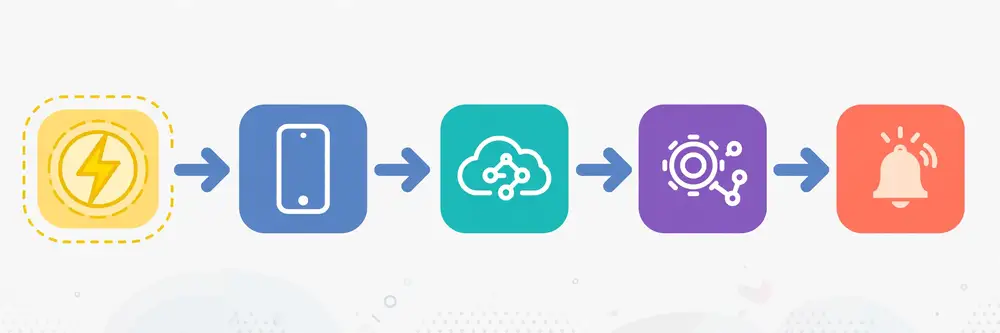
Every workflow, no matter how complex, decomposes into five parts:
Drawing this on paper before writing code is the highest-leverage habit in automation. A five-box sketch exposes missing steps (who validates the data?), ambiguous branches (what counts as "complete"?), and notification gaps (who learns about failures?) while they are still cheap to fix.
Let us design a realistic researcher workflow: every morning, check whether any new papers cite your key publications, and send yourself a digest.
Notice how each step has one job and passes a well-defined bundle to the next. That separation is what makes the workflow testable: you can run Step 1 alone and inspect its output before Step 2 ever runs.
A clean implementation keeps orchestration separate from the individual API calls:
import json, os, smtplib, datetime
from email.message import EmailMessage
import requests

SEEDS = ["10.1234/example.doi1", "10.1234/example.doi2"]   # your key papers
STATE_FILE = "seen_citations.json"
session = requests.Session()
session.headers.update({"User-Agent": "CiteMonitor/1.0 (mailto:you@university.edu)"})

def load_state():
    try:
        return set(json.load(open(STATE_FILE)))
    except FileNotFoundError:
        return set()

def save_state(seen):
    json.dump(sorted(seen), open(STATE_FILE, "w"), indent=2)

def fetch_recent_citations(doi, days=7):
    """Step 1: works citing `doi`, published in the last `days` days."""
    since = (datetime.date.today() - datetime.timedelta(days=days)).isoformat()
    work_id = "https://doi.org/" + doi
    r = session.get(
        "https://api.openalex.org/works",
        params={"filter": f"cites:{work_id},from_publication_date:{since}",
                "per-page": 50},
        timeout=20,
    )
    r.raise_for_status()
    return r.json().get("results", [])

def summarize(work):
    """Step 3: shrink a work record to the fields the digest needs."""
    return {
        "title": work.get("title"),
        "year": work.get("publication_year"),
        "doi": work.get("doi"),
        "venue": ((work.get("primary_location") or {}).get("source") or {}).get("display_name"),
        "cited_seed": work.get("id"),
    }

def send_digest(items):
    """Step 5: email the digest."""
    msg = EmailMessage()
    msg["Subject"] = f"New citations digest — {datetime.date.today().isoformat()}"
    msg["From"] = os.environ["SMTP_USER"]
    msg["To"] = os.environ["DIGEST_TO"]
    lines = [f"- {i['title']} ({i['year']}) — {i['venue']} — {i['doi']}" for i in items]
    msg.set_content("New works citing your papers:\n\n" + "\n".join(lines))
    with smtplib.SMTP(os.environ["SMTP_HOST"], 587) as s:
        s.starttls()
        s.login(os.environ["SMTP_USER"], os.environ["SMTP_PASS"])
        s.send_message(msg)

def main():
    seen = load_state()
    fresh = []
    for doi in SEEDS:                                   # Step 1: collect
        for work in fetch_recent_citations(doi):
            wid = work.get("id")
            if wid and wid not in seen:                  # Step 2: filter
                fresh.append(summarize(work))            # Step 3: enrich
                seen.add(wid)
    save_state(seen)                                     # persist BEFORE notifying
    if fresh:
        send_digest(fresh)                               # Steps 4+5: render + notify
        print(f"Digest sent: {len(fresh)} new citations.")
    else:
        print("No new citations.")

if __name__ == "__main__":
    main()
Study the structure, not just the API calls. Each step is a function with a clear contract. State is persisted before the notification goes out, so a crash during email sending cannot cause duplicate digests tomorrow. The trigger (scheduling) is deliberately absent from the code — scheduling is Chapter 9's job, and keeping it separate means you can test the whole workflow manually today and schedule it unchanged tomorrow.
The most common source of workflow bugs is fuzzy handoffs: Step 2 produces "the papers" but Step 3 expected a list of dicts with a doi key and got a list of strings. Prevent this by defining each handoff explicitly — even just as a comment or docstring stating the shape: "Step 2 outputs a list of OpenAlex work dicts; Step 3 consumes work dicts and returns summary dicts with keys title/year/doi/venue." When a workflow grows beyond a single script, these contracts become formal (JSON schemas, typed dataclasses), but the discipline starts here: name the shape of data at every boundary.
Workflows need explicit failure branches, not just the happy path. Ask of every step: "what happens when this fails?" Reasonable answers include: retry (transient network error), skip-and-log (one malformed record among thousands), quarantine (a record that fails validation goes to a review file, not the main dataset), and abort-with-alert (authentication failure — nothing downstream can work, wake a human). Encode the decision in code rather than hoping:
for work in fetch_recent_citations(doi):
    try:
        summary = summarize(work)
        validate(summary)          # raises ValueError on bad data
    except ValueError as e:
        quarantine.append({"work": work.get("id"), "reason": str(e)})
        continue                   # skip-and-log: one bad record must not kill the run
    fresh.append(summary)
Chapter 8 systematizes retry and rate-limit strategy; the point here is architectural: error branches are designed, not discovered.
So far the chain stayed within one API plus email. Real workflows cross services: a form webhook (Chapter 5) triggers enrichment via a geocoding API, storage in a spreadsheet API, and a message to a team channel. The principles do not change — trigger, steps, handoffs, branches, outputs — but two new concerns appear. First, credentials multiply: each service needs its own secret, each stored per Chapter 3's rules and each granted minimum scope. Second, partial failure becomes likely: the enrichment succeeded but the spreadsheet write failed. The remedy is the same idempotency thinking from Chapter 5: make each step safe to re-run (upserts keyed on stable IDs, dedupe on event IDs), log every step's outcome, and design a "resume from step N" path so a failed run continues rather than restarting from scratch.
A workflow nobody documented is a workflow nobody can fix, hand over, or defend in a methods section. Keep a short README next to every automation: what it does, what triggers it, which services and credentials it uses (names, not values), the data handoff shapes, how to run it manually, where logs live, and what to do when it fails. Five minutes of writing saves hours of archaeology later — and for researchers, that README often becomes the reproducibility appendix almost verbatim.
As workflows grow, a few reusable patterns keep them manageable. Fan-out/fan-in parallelizes independent work: instead of enriching 500 records sequentially, split them into batches processed concurrently (threads or a task queue), then join the results. In Python, a modest thread pool with a strict per-host concurrency cap is usually enough — and the cap matters: fanning out 50 simultaneous requests at a free API is how you get throttled (Chapter 8). Fan-out also needs fan-in discipline: collect per-batch results, and if one batch fails, retry just that batch rather than the whole job.
Human-in-the-loop inserts an approval step where judgment is required: the workflow prepares a proposed action (say, a batch of records to publish or emails to send) and pauses, notifying you with a summary and an approve/reject link. Implementation can be as simple as writing the proposal to a file and waiting for a human to run an approve.py script, or as polished as a chat message with buttons. The principle: automate the preparation, keep humans on the decision — especially for irreversible or public-facing actions.
Dry-run mode is the pattern that makes the other two safe to develop. Add a --dry-run flag that executes every read and transformation but replaces every write (API POSTs, file appends, emails) with a log line saying what would have happened:
DRY_RUN = "--dry-run" in sys.argv

def publish(record):
    if DRY_RUN:
        log.info("[dry-run] would publish %s", record["doi"])
        return
    session.post(PUBLISH_URL, json=record, timeout=20).raise_for_status()
Run every new workflow in dry-run mode against real inputs first. It catches mapping errors, wrong endpoints, and embarrassing email drafts before they touch the real world — the cheapest insurance in automation.
One more technique for multi-service chains: idempotency keys on POST. Where a provider supports an Idempotency-Key header, generate a stable key per logical operation (e.g., a hash of the record ID + operation name) and send it with the request. If your request times out and you retry, the provider recognizes the key and returns the original result instead of creating a duplicate — making even non-idempotent POSTs safe to retry.
Professional automation is tested automation. Three layers, from cheapest to most thorough:
1. Unit-test the step functions. Each pure function (mapping, filtering, digest rendering) gets tests with realistic sample payloads — including the nasty ones (missing fields, empty lists, Unicode). Python's built-in unittest or pytest both work; the point is that map_work() is verified against a frozen sample response, so an API schema change breaks a test (loud, local) instead of a production run (silent, at 3am).
def test_map_work_missing_journal():
    work = {"id": "W1", "title": "T", "doi": "https://doi.org/10.1/x",
            "primary_location": None, "authorships": []}
    out = map_work(work)
    assert out["journal"] is None and out["doi"] == "10.1/x"
2. Integration-test against a sandbox. Many APIs offer test/sandbox environments or read-only endpoints safe to hit freely. Run the full workflow end-to-end there on a schedule before pointing it at production credentials. Where no sandbox exists, record a real response once, save it as a fixture file, and test the pipeline against the fixture.
3. Dry-run in production. The --dry-run flag from the previous section, run on the real schedule with real inputs, verifying that triggers fire, data flows, and notifications would send. Only after a clean dry-run week do you enable writes.
Keep a tests/ directory next to the workflow with the fixtures and a README line explaining how to run them. When a lab mate inherits your automation, the tests are executable documentation of what each step promises — far more reliable than comments.
Before scheduling a workflow, do back-of-envelope capacity math. Estimate: (requests per run) × (runs per month) = monthly API consumption, and compare against the documented quota. A daily digest querying 5 seed papers with 2 pages each is 10 requests/day — 300/month, trivial. A weekly harvest of 40,000 records at 100/page is 400 requests/week — fine for most scholarly APIs, but check daily caps. Then estimate runtime: (requests × average latency) + politeness delays. At 1 second per request plus 0.5s delay, that 400-request harvest takes ~10 minutes — schedule accordingly and set the job's overall timeout with headroom (30 minutes, not 11). This arithmetic takes five minutes and prevents the two classic surprises: blowing a monthly quota on day 3, and a "quick" job that overruns into the next scheduled run. Write the estimates in the README; when the workflow grows, the numbers tell you exactly which assumption broke.
For your research: Sketch the literature-monitor workflow from this chapter adapted to your own work: what are your seed papers, which API gives you "cited by" data, where would state live, and who gets notified? Then implement just Steps 1–3 (collect, filter, summarize) and print the results. You will have a working prototype of a genuinely useful research tool — and the design sketch to extend it.
Key takeaways: - Every workflow is trigger → inputs → steps → branches → outputs/notifications; sketch it before coding. - Separate orchestration from API calls: one function per step, each with a clear input/output contract. - Define data handoffs explicitly; most workflow bugs are shape mismatches at step boundaries. - Design error branches per step: retry, skip-and-log, quarantine, or abort-with-alert. - Persist state before side effects (like notifications) so crashes cannot cause duplicates. - Make cross-service steps idempotent and re-runnable; document the workflow like a methods section.
Not every automation needs Python. A large industry of no-code/low-code platforms — Zapier, Make (formerly Integromat), n8n, Microsoft Power Automate, IFTTT — lets you build workflows by connecting boxes in a browser: "when a new row appears in this spreadsheet, create a task in that app and send me a message." This chapter teaches you what these platforms are good at, where they break down, and how to choose between clicking and coding — because a researcher who knows both reaches for the right tool instead of the familiar one.
A no-code automation platform is a hosted workflow engine with three assets you do not have to build yourself: connectors (pre-built integrations for thousands of apps — Gmail, Google Sheets, Slack, Trello, Typeform, and hundreds more), a visual builder (trigger → steps → actions drawn as a flowchart), and hosting (your workflow runs on their servers on a schedule or in response to events, with logging and retry built in). You authenticate each app once through OAuth in the browser, drag the steps together, map fields by clicking ("put the form's email answer into the spreadsheet's Email column"), and turn it on.
A typical researcher-friendly example, built in minutes with zero code: a "conference deadline tracker" where a scheduled trigger runs weekly, an RSS step fetches calls-for-papers feeds, a filter step keeps only items matching your keywords, and an email step sends you the shortlist. Or a participant-management flow: Typeform response → add row to Google Sheets → create a folder in cloud storage → send the participant a confirmation email → notify your team channel.
| Dimension | No-code platforms | Code (Python + APIs) |
|---|---|---|
| Speed to first result | Minutes to hours | Hours to days |
| Programming needed | None | Python + HTTP basics |
| App coverage | Thousands of pre-built connectors | Any API with documentation |
| Complex logic | Limited (filters, simple branches) | Unlimited |
| Data transformation | Basic mapping; struggles with messy data | Full power (pandas, custom logic) |
| Scale | Per-task pricing; costs grow with volume | Near-zero marginal cost |
| Reliability/debugging | Opaque; dependent on vendor | Full logs; you control retries |
| Vendor lock-in | Workflows live on their platform | Your code runs anywhere |
| Reproducibility | Click-history; hard to version or cite | Git-versioned, auditable scripts |
The pattern that emerges: no-code wins for simple glue between popular apps; code wins for scale, cost, complex logic, and anything you must reproduce or defend. A ten-step workflow moving form responses into a spreadsheet and sending confirmations is a no-code sweet spot. A nightly harvest of 50,000 bibliographic records with deduplication, fuzzy matching, and statistical summaries is a code job — doing it on a per-task-priced platform would be slow and expensive.
One platform deserves special attention for researchers: n8n ("nodemation"), an open-source workflow automation tool you can self-host. It offers the visual builder and hundreds of connectors like the commercial platforms, but because it is open source and self-hostable, it avoids per-task pricing and keeps your data on your own infrastructure — significant advantages when handling participant data under ethics-board constraints. It also includes code nodes where you can drop in JavaScript or Python for steps the visual nodes cannot express. For a lab that wants no-code speed without subscription costs or data leaving the building, n8n is the pragmatic middle path. (As with any self-hosted tool, you take on maintenance: updates, backups, and security are yours.)
When facing an automation candidate, walk through these questions in order:
Many researchers end up hybrid: no-code for the human-facing glue (forms → notifications → spreadsheets the team sees) and Python for the analytical core (harvesting, cleaning, analysis) — with the two meeting at a shared spreadsheet, database, or webhook.
Go in with eyes open. Pricing cliffs are the classic surprise: a workflow that polls every 5 minutes consumes thousands of "tasks" monthly even when nothing happens — prefer webhook triggers over polling triggers wherever the platform supports them. Connector gaps mean the exact app or the exact operation you need may not exist, and custom API steps inside no-code tools are clunkier than plain Python. Debugging is harder: when a step fails at 3am, you get the vendor's error panel, not your own logs. Versioning is weak: there is no git diff for a rearranged flowchart, which makes methods-section reproducibility awkward. And platform risk is real: pricing changes, connector deprecations, or service shutdowns can strand a workflow you depend on — keep an export or a written spec of anything critical.
None of this disqualifies no-code; it just prices it correctly. For administrative workflows — the conference tracker, the application pipeline, the reading-group scheduler — the speed advantage usually dominates. For research-data pipelines, code's auditability usually wins.
Let's make the abstract concrete. Suppose you build the conference-deadline tracker on a generic no-code platform. The build goes: trigger — schedule, every Monday 07:00. Step 1 — RSS module fetching two calls-for-papers feeds. Step 2 — filter module keeping items whose title or description matches any of your keywords ("photovoltaic," "microgrid," your methods). Step 3 — formatter turning matches into a readable list. Step 4 — email module sending it to you. Total build time: under an hour, most of it spent choosing keywords. Maintenance: near zero until a feed URL changes. This is the no-code sweet spot — linear, popular apps, human-scale volume, and the "logic" is a keyword list you could explain in one sentence.
Now the cost math that governs scale. No-code platforms typically meter "tasks" or "operations" — roughly, each step execution. A workflow with 4 steps running on 50 items weekly consumes about 800 tasks/month: trivial on any free tier. But change the design to polling every 15 minutes (96 checks/day whether or not anything happened) with 5 steps, and you're near 15,000 tasks/month — suddenly a paid tier, for a workflow that mostly checks empty feeds. Two rules follow: prefer webhook/event triggers over polling triggers (events cost nothing when nothing happens), and estimate monthly task volume before building anything that polls frequently or processes large lists.
Migration signals — when to rebuild a no-code workflow in code — are worth recognizing early: the workflow needs branching logic the visual builder can't express; monthly task costs exceed the value of the time saved; debugging a 3am failure through the vendor's UI takes longer than reading your own logs would; you need the process versioned, cited, or handed to a collaborator; or the data must not leave your infrastructure (participant data, unpublished results). Migration doesn't have to be all-or-nothing: a common path keeps the no-code trigger and notifications while moving the heavy step (dedupe, analysis) into a small Python service called via webhook — the hybrid architecture from this chapter, evolving gracefully.
The bridge option from this chapter deserves a concrete look, because "self-hosted" sounds free until you count the labor. A minimal n8n deployment is genuinely small — a single container on a lab server or inexpensive VM, with its data in a mounted volume or a small database. The ongoing work is what matters: updates (n8n releases frequently; connectors especially — schedule a monthly update window and test critical workflows after each), backups (the workflow definitions and credentials live in n8n's database — back it up like you'd back up research data, because it is operational research data), TLS (webhook triggers need HTTPS — a reverse proxy with automatic certificates is the standard answer), and access control (n8n's editor is powerful — put it behind authentication and restrict who can edit production workflows).
When does self-hosting pay? Roughly: when the lab runs enough automation that commercial per-task pricing exceeds the cost of a small VM plus a few hours of monthly maintenance; when data must stay on institutional infrastructure (ethics boards, grant terms); or when you need custom nodes and code steps the hosted tiers restrict. When doesn't it? When one person maintains it as a side hobby with no backup maintainer — a self-hosted automation platform whose only administrator graduates is a liability, not an asset. If you self-host, document the setup (how to restart it, where backups live, how to update) in the lab's shared notes from day one, and make sure at least two people can perform the basics.
Treat your automations as a portfolio, not isolated hacks. Keep one index — a simple markdown file or wiki page — listing every workflow you run: name, purpose, trigger/schedule, services involved, credential names, log location, and runbook link. Review it quarterly and retire what no longer earns its keep; every live automation is a small maintenance obligation, and dead ones are where credentials leak and surprises breed. Share the portfolio with your lab or supervisor: it demonstrates research-ops maturity, invites collaboration ("I built X — want one for your project?"), and provides continuity if you hand the work over. For publication students, the portfolio doubles as evidence of transferable skills — "designed and operated five automated data pipelines" is a line that belongs on a CV, and the portfolio is what backs it up in an interview.
No-code's weak versioning (Chapter 7's comparison table) is manageable with discipline: export the workflow definition regularly (most platforms offer JSON export), screenshot the flow with step settings visible, and keep a change log — date, what changed, why. Store these next to your other project docs. It isn't git, but it turns "who changed the filter?" from a mystery into a five-minute lookup, and it gives you a migration blueprint if you ever rebuild the flow in code.
Every no-code workflow should have a documented exit strategy: where its logic lives (exported definition + written spec), what replaces it if the platform raises prices or retires a connector, and how you'd migrate data out. You may never use it — but writing it forces you to keep workflows simple and documented, which pays off regardless. Platform independence is a spectrum, and even a paragraph of exit notes moves you along it.
For your research: List three admin chores in your research life (tracking applications, logging reading notes, scheduling meetings, monitoring deadlines). For each, run the six-question decision procedure above and write down the verdict: no-code, code, or hybrid — with one sentence of reasoning. This is the beginning of an automation portfolio, and it trains the judgment this chapter is really about: matching tool to task.
Key takeaways: - No-code platforms (Zapier, Make, n8n, Power Automate) connect apps visually: trigger → steps → actions, hosted and scheduled for you. - No-code wins on speed and app coverage for simple glue; code wins on scale, cost, complex logic, debugging, and reproducibility. - n8n is the notable bridge: open-source, self-hostable, with code nodes — good for labs with data-sovereignty needs. - Decide with the six questions: linearity, connectors, volume, data complexity, reproducibility, sensitivity. - Watch pricing cliffs (prefer webhook triggers over polling), weak versioning, and platform risk; keep a spec of critical workflows.
So far our scripts assumed a friendly world: servers answer promptly, data is well-formed, and nobody minds how fast we ask. Production automation lives in a messier world — networks drop, servers have bad days, data surprises you, and every API rations how fast you may call it. This chapter is about building scripts that survive that world: treating failure as a normal, planned-for event rather than an exception to the plan.
Failures fall into three families, each demanding a different response:
503 Service Unavailable, 429 Too Many Requests, DNS hiccups. Response: wait and retry.400 Bad Request (malformed parameters), 401 (bad credentials), 404 (wrong ID), 422 (validation failed). Response: fix the request, log loudly, do not retry blindly..get() habits), quarantine bad records, continue the run.The cardinal rule: never retry a client error without changing something, and always bound your retries — an unbounded retry loop against a dead server is how a small script becomes a denial-of-service incident.
The standard retry strategy is exponential backoff with jitter: wait 1 second, then 2, then 4, then 8… plus a small random jitter so that many clients retrying simultaneously do not synchronize into a thundering herd. Retry only transient failures (timeouts, 5xx, 429), cap the attempts (5 is a common default), and log each attempt:
import random, time
import requests

def get_with_retry(session, url, params=None, max_attempts=5, timeout=15):
    delay = 1.0
    for attempt in range(1, max_attempts + 1):
        try:
            r = session.get(url, params=params, timeout=timeout)
            if r.status_code == 429 or 500 <= r.status_code < 600:
                raise requests.exceptions.HTTPError(f"retryable status {r.status_code}", response=r)
            r.raise_for_status()
            return r
        except (requests.exceptions.Timeout,
                requests.exceptions.ConnectionError,
                requests.exceptions.HTTPError) as e:
            if attempt == max_attempts:
                raise                                   # out of attempts: fail loudly
            wait = delay + random.uniform(0, 1)         # exponential + jitter
            print(f"Attempt {attempt} failed ({e}); retrying in {wait:.1f}s…")
            time.sleep(wait)
            delay *= 2
Note the deliberate choice: raise_for_status() inside the try means genuine client errors (400/401/404) raise HTTPError too — but we only convert 429 and 5xx into retries; other 4xx errors propagate immediately because retrying them is pointless. Distinguishing retryable from fatal is the heart of the function.
Every shared API rations usage through rate limits: N requests per minute/hour/day, sometimes with separate buckets per endpoint or per key. Providers communicate limits through response headers — commonly X-RateLimit-Limit (your quota), X-RateLimit-Remaining (what is left), and X-RateLimit-Reset (when the window renews, as a Unix timestamp) — and enforce them with 429 Too Many Requests, often including a Retry-After header telling you exactly how many seconds to wait.
A respectful client does four things:
Retry-After when it receives a 429, rather than applying its own guess.User-Agent (Chapter 2) so the provider can warn rather than block.import time
def respect_rate_limit(response):
remaining = response.headers.get("X-RateLimit-Remaining")
reset = response.headers.get("X-RateLimit-Reset")
if remaining is not None and int(remaining) < 5 and reset:
sleep_for = max(0, int(reset) - int(time.time()) + 2)
print(f"Quota nearly exhausted; sleeping {sleep_for}s…")
time.sleep(sleep_for)
def handle_429(response):
retry_after = response.headers.get("Retry-After")
wait = int(retry_after) if retry_after else 60
print(f"Rate limited; waiting {wait}s as instructed…")
time.sleep(wait)
For free scholarly APIs without published headers, the practical rule is simpler: keep a steady, modest pace (a request every second or two), harvest off-peak, and never parallelize aggressively against a free service. Your script's speed is not worth getting your university's IP range throttled.
Chapter 4 showed basic page looping. Production pagination adds three refinements. First, prefer cursors over page numbers when the API offers both — cursors survive mid-harvest data changes. Second, checkpoint your progress: write completed pages to disk as you go, so a crash on page 87 resumes at page 87 instead of restarting. Third, validate page integrity: check that each page's size and ordering look sane, because a silently truncated harvest is worse than a crashed one — it produces confident, wrong datasets.
import json

checkpoint = "harvest_checkpoint.json"
try:
    state = json.load(open(checkpoint))          # {"next_cursor": "...", "count": 1234}
except FileNotFoundError:
    state = {"next_cursor": None, "count": 0}

while True:
    params = {"cursor": state["next_cursor"], "per-page": 100} if state["next_cursor"] else {"per-page": 100}
    r = get_with_retry(session, url, params=params)
    respect_rate_limit(r)
    body = r.json()
    batch = body.get("results", [])
    append_to_storage(batch)                      # your storage function
    state["count"] += len(batch)
    state["next_cursor"] = body.get("meta", {}).get("next_cursor")
    json.dump(state, open(checkpoint, "w"))       # checkpoint EVERY page
    if not state["next_cursor"]:
        break
print(f"Harvest complete: {state['count']} records.")
Checkpointing converts a fragile multi-hour harvest into a resumable one — the difference between "the job failed overnight" being a disaster and being a minor inconvenience.
Set timeouts at two levels: per-request (timeout=15) and per-run (an overall deadline after which the job stops and reports partial results). For workflows calling flaky services repeatedly, consider a circuit breaker: after N consecutive failures, stop calling the service for a cooldown period and fail fast instead — this protects both you (no wasted hours) and the struggling provider (no pile-on traffic). Even a simple counter-based version ("5 failures in a row → sleep 10 minutes before trying again") captures most of the benefit.
Graceful degradation means deciding in advance what a partial success looks like: if the enrichment API is down, do you store unenriched records and flag them, or halt the whole run? For research pipelines, storing raw records with a needs_enrichment flag is usually right — the irreplaceable asset is the collected data; enrichment can be re-run later from the raw log (the same "persist raw first" principle as Chapter 5's webhook receiver).
Every retry, skip, quarantine, and abort should be logged with context: timestamp, step name, the request that failed (URL without credentials), the error, and what the script decided to do. Python's logging module, configured once, beats print because it timestamps, levels (INFO/WARNING/ERROR), and routes to files:
import logging

logging.basicConfig(
    level=logging.INFO,
    format="%(asctime)s [%(levelname)s] %(name)s: %(message)s",
    handlers=[logging.FileHandler("harvest.log"), logging.StreamHandler()],
)
log = logging.getLogger("harvest")

log.warning("Page 12 returned 0 results unexpectedly; continuing.")
log.error("Authentication failed (401); aborting run — check RESEARCH_API_TOKEN.")
A log file is the difference between "the script broke" and "the script broke at step 3 on record 4,112 because the API returned HTML instead of JSON, and here is the exact timestamp to correlate with the provider's status page." Chapter 9 builds monitoring on top of these logs.
Retries handle failures you detect; response validation catches failures that look like success. An API can return 200 with an HTML error page (a proxy hiccup), a truncated body, or a schema it changed overnight. A lightweight shape check before processing turns silent corruption into a loud, catchable error:
def validate_work_payload(body):
    if not isinstance(body, dict) or "results" not in body:
        raise ValueError(f"unexpected response shape: {str(body)[:200]}")
    if not isinstance(body["results"], list):
        raise ValueError("results is not a list")
    return body
Run every response through a validator matched to what the code actually consumes. It's five lines that have saved many datasets.
Bulkheads — borrowed from shipbuilding — isolate failures so one bad dependency can't sink the whole workflow. In practice: separate sessions (and separate retry budgets) per external service, so a slow geocoding API can't starve the main harvest of threads or time; per-step timeouts in addition to per-request ones; and for concurrent work, bounded worker pools rather than unbounded threads. If step 3 of 5 depends on a flaky service, the bulkhead lets steps 1–2 bank their results safely while step 3 retries on its own.
A dead-letter queue is where hopeless items go instead of blocking the run: records that fail validation after retries, events that can't be processed, API calls that exhaust the retry budget. Implement it as simply as an append-only file or table storing the raw item plus the error and timestamp. The discipline that makes it work is the review ritual: someone looks at the dead-letter file weekly, fixes systemic causes (a changed schema, a bad mapping rule), and replays the fixable items. Without the ritual, a dead-letter queue is just a trash can; with it, it's a diagnostic instrument.
Finally, run failure drills the way pilots run simulator sessions. Quarterly, pick a workflow and break it on purpose in a safe environment: revoke a test credential, return garbage from a mock endpoint, kill the network mid-harvest. Watch what happens. Every drill teaches you something the happy path never will — usually that an alert goes to the wrong address, a log is missing the crucial field, or the runbook's first step is outdated. Update the runbook after each drill; that's the drill's real output.
Pagination has sharp edges worth knowing. Inconsistent page sizes: the last page is short (normal), but some APIs also return short pages mid-result when under load — never treat a short page as the end; only an empty page or an absent cursor means "done." Total counts lie: the meta.count many APIs report is often an estimate that shifts as you page — use it for progress display, never as a loop bound. Deep paging degrades: page 1,000 can be slower and less consistent than page 1; cursor pagination exists precisely to avoid this, so prefer it for harvests beyond a few thousand records.
Keep a 429 playbook — a fixed procedure your code follows every time it's throttled:
Retry-After header; if present, sleep exactly that long.And know the politeness ladder for free scholarly APIs: 1 request/second is safe nearly everywhere; 2–5/second is fine for many; beyond that, check the docs or ask. Parallel requests multiply your effective rate — four workers at 1/second each is 4/second total. When in doubt, be the courteous guest: these free services run on goodwill and grants, and researchers who harvest politely keep them alive for everyone.
When an API misbehaves, check the provider's status page before debugging your code — most serious providers publish one, and a surprising share of "my script broke" incidents are upstream outages. Bookmark the status pages of every API you depend on; better, subscribe to their incident feeds where offered. Equally important over longer timescales: deprecation signals. Responsible APIs announce breaking changes via changelogs, email lists, and the Sunset HTTP response header (RFC 8594), which names the date an endpoint will stop working. Treat any Sunset header or deprecation notice as a scheduled task: diary it, plan the migration, and don't discover the shutdown on the morning it happens. Finally, keep a dependency watch habit: quarterly, re-read the changelog of each API you automate against. Ten minutes every three months prevents the archetypal automation failure — code that worked for a year dying silently because v1 was retired.
For your research: Take any script from Chapters 4–6 and harden it: wrap its API calls in the retry function above, add checkpointing to its longest loop, and replace its
Key takeaways:
- Classify failures: transient (retry), client errors (fix, don't blindly retry), data errors (validate, quarantine, continue).
- Retry with exponential backoff + jitter, bounded attempts, and only for retryable failures; never retry 4xx blindly.
- Respect rate limits: read docs, honor Retry-After, watch quota headers, keep a polite pace on free APIs.
- Paginate with cursors when available; checkpoint every page so long harvests are resumable.
- Persist raw data first; enrich later. Log every failure with context. Design partial success deliberately.
A script you run by hand is a tool; a script that runs itself, handles its own failures, and tells you when it needs attention is infrastructure. This chapter covers the two disciplines that complete that transformation: scheduling (running jobs automatically at the right times) and monitoring (knowing they ran, knowing they are healthy, and being alerted when they are not).
cron is the classic Unix scheduler — a timetable that runs commands at specified minutes, hours, days. A line in your crontab like 0 7 * * * means "at 07:00 every day," and the command can be your Python script:
# crontab entry: run the citation digest every weekday at 07:00
0 7 * * 1-5 /usr/bin/python3 /home/you/automation/cite_digest.py >> /home/you/automation/logs/cite_digest.log 2>&1
cron is simple, free, and everywhere — ideal for a personal workstation or a lab server that stays on. Its weaknesses: it assumes the machine is awake at the scheduled time (laptops sleep), it has no built-in retry or dependency handling, and its failure notifications are limited to local email. Always use absolute paths in cron jobs (cron's environment is minimal), and redirect output to a log file — a cron job whose output goes nowhere is unobservable.
OS-level schedulers fill the non-Unix gaps: Windows Task Scheduler and macOS's launchd both run programs on timetables with options like "run when the machine wakes" or "retry if missed." Managed schedulers — GitHub Actions' scheduled workflows, cloud cron services, or a platform like n8n's scheduler — run your jobs on someone else's always-on infrastructure, which solves the sleeping-laptop problem and usually adds run history and notifications. GitHub Actions is a particularly researcher-friendly option: your automation script lives in a repository, a workflow file schedules it, secrets live in the repo's encrypted secret store, and every run is logged and visible.
For workflows with dependencies ("run the harvest, and only if it succeeds, run the analysis, then the report"), step up to a workflow orchestrator (Apache Airflow, Prefect, or even a Makefile for simple chains). Orchestrators model pipelines as directed graphs of tasks with retries, alerting, and backfill — overkill for a daily digest, essential for a multi-stage data pipeline feeding a thesis.
Two questions determine every schedule. How fresh must the data be? A citation digest is fine daily; a conference-deadline tracker might be weekly; a sensor-monitoring workflow might be every 15 minutes. Match frequency to genuine need — each run costs API quota, compute, and log storage. When should it run? Prefer off-peak hours for heavy harvests (be kind to free APIs), avoid running exactly on the hour (everyone else's cron fires then — the :07 or :23 is less contended), and consider time zones: "7am" means something different to the server than to you. Document the schedule and its reasoning in the workflow's README; "why daily?" is a question your future self will ask.
A monitored automation answers four questions at all times:
Implementing this need not be elaborate. A health-check file pattern covers liveness and basic correctness with almost no infrastructure:
import json, datetime, sys

HEALTH_FILE = "health.json"

def report_health(status, detail=""):
    json.dump({
        "last_run": datetime.datetime.utcnow().isoformat(),
        "status": status,          # "ok", "warning", "error"
        "detail": detail,
    }, open(HEALTH_FILE, "w"))

def main():
    try:
        count = run_workflow()     # your workflow; returns records processed
        if count == 0:
            report_health("warning", "run succeeded but collected 0 records")
        else:
            report_health("ok", f"collected {count} records")
    except Exception as e:
        report_health("error", str(e))
        raise                      # non-zero exit so the scheduler marks failure
A second tiny script — or a no-code check — reads health.json daily and messages you if last_run is stale or status is error. This two-file pattern (worker + watcher) is monitoring in its most honest form: the worker reports, the watcher verifies, and silence from either is itself a signal.
Alerts should be rare, actionable, and specific. "Citation digest failed: 401 from api.openalex.org at 07:03 — check credentials" gets fixed; a daily "job completed successfully" email gets filtered into oblivion and trains you to ignore the channel — so when a real failure arrives in the same channel, you miss it. Good alerting rules:
For delivery, email works, but chat webhooks (a POST to a team channel's incoming-webhook URL — Chapter 5 in reverse) are often better: visible to the whole lab, searchable, and easy to thread discussions around.
Chapter 8 introduced logging for failures; monitoring extends it to runs. Keep structured, timestamped logs per run (one file per date is a simple scheme), retain them long enough to diagnose trends (weeks, not hours), and log the numbers that matter: records fetched, records stored, records quarantined, duration, quota remaining. When your supervisor asks "how did you build this dataset?" — or a reviewer asks — those logs plus the versioned script are your provenance record. Reproducibility is not just about code; it is about evidence that the code ran as claimed.
For researchers, GitHub Actions scheduled workflows hit a sweet spot: the code lives in a repository, the schedule is a versioned YAML file, secrets live in the repo's encrypted secret store, and every run leaves a visible log. Here's a complete workflow file (.github/workflows/observatory.yml) for the capstone project:
name: field-observatory
on:
  schedule:
    - cron: "30 6 * * *"      # 06:30 UTC daily ("30 6" = minute 30, hour 6)
  workflow_dispatch:          # also allow manual runs from the Actions tab
jobs:
  run:
    runs-on: ubuntu-latest
    steps:
      - uses: actions/checkout@v4
      - uses: actions/setup-python@v5
        with:
          python-version: "3.12"
      - name: Install dependencies
        run: pip install -r requirements.txt
      - name: Run observatory
        env:
          RESEARCH_API_TOKEN: ${{ secrets.RESEARCH_API_TOKEN }}
          CONTACT_EMAIL: ${{ secrets.CONTACT_EMAIL }}
          SMTP_USER: ${{ secrets.SMTP_USER }}
          SMTP_PASS: ${{ secrets.SMTP_PASS }}
        run: python observatory.py
      - name: Upload logs
        if: always()                       # keep logs even when the run fails
        uses: actions/upload-artifact@v4
        with:
          name: logs-${{ github.run_id }}
          path: logs/
Key details: workflow_dispatch gives you a manual "run now" button for testing; secrets are referenced as ${{ secrets.NAME }} and never appear in logs (GitHub redacts them automatically); the log-upload step with if: always() preserves evidence from failed runs. Cron in Actions uses UTC — convert your desired local time accordingly, and remember Pakistan (PKT, UTC+5) doesn't observe daylight saving, so the offset is stable year-round.
Log retention deserves a deliberate policy: keep detailed per-run logs for 30–90 days (long enough to diagnose trends and answer questions), then archive or delete. On a VM, a tiny logrotate configuration or a cleanup snippet in the workflow prevents the classic failure of a disk filled by years of logs. And for the health-watcher pattern from this chapter, note that Actions itself can be the watcher: a second scheduled workflow that reads the first workflow's recent run status via the GitHub API and messages you on failure — monitoring composed from the same primitives as the work itself.
Chapter 9 introduced the health-file pattern; here is the other half — the watcher script that reads it and raises the alarm. It runs on its own schedule (slightly less frequent than the workflow it watches) and checks two things: freshness and status.
# watcher.py: alert if the observatory has not reported healthy recently.
import json, os, smtplib, datetime
from email.message import EmailMessage

HEALTH_FILE = "state/health.json"
MAX_AGE_HOURS = 30          # workflow runs daily; 30h of silence is suspicious

def send_alert(subject, body):
    msg = EmailMessage()
    msg["Subject"] = subject
    msg["From"] = os.environ["SMTP_USER"]
    msg["To"] = os.environ["ALERT_TO"]
    msg.set_content(body)
    with smtplib.SMTP(os.environ["SMTP_HOST"], 587) as s:
        s.starttls()
        s.login(os.environ["SMTP_USER"], os.environ["SMTP_PASS"])
        s.send_message(msg)

def main():
    try:
        health = json.load(open(HEALTH_FILE))
    except FileNotFoundError:
        return send_alert("WATCHER: no health file",
                          "The workflow has never reported. Check the scheduler.")
    age = datetime.datetime.utcnow() - datetime.datetime.fromisoformat(health["last_run"])
    if age > datetime.timedelta(hours=MAX_AGE_HOURS):
        send_alert("WATCHER: stale workflow",
                   f"Last healthy run {age} ago. Check the scheduler and logs.")
    elif health["status"] == "error":
        send_alert("WATCHER: workflow reported error", health.get("detail", ""))

if __name__ == "__main__":
    main()
Schedule the watcher with its own cron line or Actions workflow, offset from the main job. Note the deliberate asymmetry: the worker writes health, the watcher reads it, and the watcher itself is simple enough to rarely fail — but do give the watcher a heartbeat too (even a weekly "watcher alive" log line you glance at). Monitoring the monitor sounds recursive, but one level of it is exactly right: it bounds the "who watches the watcher" problem at a point where failure is visible and cheap.
Every scheduled workflow needs a runbook — the document a half-asleep human follows at 2am. Keep it to one page with five sections: 1. What this does (one paragraph). 2. Normal signs (what a healthy run's log looks like; expected record counts and duration). 3. Common failures — a table of symptom → likely cause → fix: e.g., "401 on all requests → token expired → regenerate at
Cron runs on system time, and most servers use UTC — which is why the Actions example uses UTC cron. If your server uses local time in a region with daylight saving, a 07:00 job silently becomes 06:00 or 08:00 twice a year. Pakistan (PKT, UTC+5) doesn't observe DST, so local scheduling is stable there — but any collaborator's server or cloud scheduler elsewhere may shift. Prefer UTC everywhere for scheduled automation, convert to local time only for display, and note the timezone next to every schedule in the README.
For your research: Pick your most useful script from earlier chapters and schedule it: cron on a machine that stays on, or a scheduled GitHub Actions workflow. Add the health-file reporting, and set up one alert (email or chat message) for failure-or-silence. Run it for two weeks. The operational lessons — a token expiring, a daylight-saving shift, a log file filling a disk — are the ones that turn a scripter into someone who runs reliable infrastructure.
Key takeaways: - Schedule with the right tool for the job: cron for simple always-on machines, OS schedulers for laptops, managed schedulers (GitHub Actions) for visibility, orchestrators for dependent pipelines. - Match frequency to genuine freshness needs; run heavy harvests off-peak and off the hour. - Monitor four signals: liveness (did it run?), correctness (did it succeed?), volume (expected amount of work?), performance (expected duration?). - The worker-reports / watcher-verifies pattern (health file + staleness check) is simple, robust monitoring. - Alert rarely and specifically — on failure and on silence — with the likely fix included; keep a runbook per workflow. - Logs are provenance: structured, timestamped, retained — they back your methods section.
APIs give you data; different APIs describe the same reality in different shapes. One service calls it author, another creator, a third authors[]; one stores dates as 2026-10-08, another as 08/10/2026, a third as a Unix timestamp; one identifies a paper by DOI, another by an internal ID, a third by title string. Data mapping and transformation — converting data from system A's conventions to system B's — is the unglamorous work that determines whether chained workflows actually work. This chapter makes it systematic.
Treat every system boundary as a translation problem. Before writing code, build a field map: a simple table listing each source field, its format, the destination field, and the transformation rule:
| Source (OpenAlex) | Format | Destination (lab DB) | Rule |
|---|---|---|---|
title |
string | paper_title |
strip whitespace; title-case not applied (preserve original) |
publication_year |
int | year |
direct copy; must be 1900–2100 |
doi |
URL string | doi |
strip https://doi.org/ prefix; lowercase |
authorships[].author.display_name |
nested list | authors |
join with ;; max 500 chars |
cited_by_count |
int | citation_count |
direct copy |
primary_location.source.display_name |
nested, nullable | journal |
None → "Unknown" |
Writing this table takes twenty minutes and prevents the most common integration bug: assuming fields line up when they do not. It also becomes documentation — future you (or a lab mate) can see exactly what each transformation decided.
Implement each row of the map as a small pure function (same input → same output, no side effects). Pure functions are trivially testable, which matters because transformations encode judgment calls that deserve verification:
import re
from datetime import datetime

def clean_doi(raw):
    """Normalize any DOI-ish string to bare lowercase '10.xxxx/...' form."""
    if not raw:
        return None
    doi = raw.strip().lower()
    doi = re.sub(r"^https?://(dx\.)?doi\.org/", "", doi)
    return doi if doi.startswith("10.") else None

def parse_date_flexible(raw):
    """Accept several date formats; return ISO 'YYYY-MM-DD' or None."""
    if not raw:
        return None
    for fmt in ("%Y-%m-%d", "%d/%m/%Y", "%m/%d/%Y", "%Y-%m", "%Y"):
        try:
            return datetime.strptime(raw.strip(), fmt).date().isoformat()
        except ValueError:
            continue
    return None

def join_authors(authorships, sep="; "):
    names = [a.get("author", {}).get("display_name", "").strip()
             for a in (authorships or [])]
    return sep.join(n for n in names if n) or None
Then compose them into a record-level mapper:
def map_openalex_to_labdb(work):
    return {
        "paper_title": (work.get("title") or "").strip() or None,
        "year": work.get("publication_year"),
        "doi": clean_doi(work.get("doi")),
        "authors": join_authors(work.get("authorships")),
        "citation_count": work.get("cited_by_count", 0),
        "journal": ((work.get("primary_location") or {}).get("source") or {}).get("display_name"),
        "retrieved_at": datetime.utcnow().isoformat(),
    }
Test each function with a handful of tricky inputs (empty strings, None, malformed dates, Unicode names) — a five-minute test script catches the edge cases that would otherwise corrupt thousands of records silently.
The deepest mapping challenge is identity: deciding that record A in system 1 and record B in system 2 describe the same real-world entity. Prefer stable external identifiers wherever they exist: DOIs for papers, ORCID iDs for researchers, ISBNs for books, ROR IDs for institutions. These are designed to be unambiguous and persistent — matching on DOI beats matching on title every time.
When no shared identifier exists, fall back to fuzzy matching with explicit confidence rules: normalize (lowercase, strip punctuation), compare on multiple fields (title + year + first author), and set a threshold above which you auto-match, below which you quarantine for human review — never auto-merge on a weak match. Record how each match was made (which identifier, which rule, what score) in a provenance column; "these two records were merged because DOIs matched" is auditable, "the script thought they looked similar" is not.
Deduplication within a single harvest follows the same logic: key records on the strongest available identifier, keep the first (or best) copy, and log duplicates rather than silently dropping them — a sudden spike in duplicates often signals an upstream data change worth knowing about.
APIs evolve: fields get renamed, deprecated, or restructured, and your mapper breaks. Defend with three habits. First, pin and record the API version you built against (many APIs version via URL path like /v1/ or a header). Second, validate incoming shapes before mapping — a lightweight check that expected top-level keys exist, logging a loud warning when they do not, so drift announces itself instead of corrupting data quietly. Third, keep the raw payloads (Chapter 4's advice again): if the schema changes, you can re-run the updated mapper over stored raw data instead of re-harvesting.
A short field guide to the transformation bugs that ambush researchers: encoding (assume UTF-8 everywhere; when reading files, specify encoding="utf-8" explicitly rather than trusting platform defaults); whitespace (strip it; also watch non-breaking spaces in copy-pasted data); numbers as strings ("2026" vs 2026 — convert deliberately); booleans as strings ("true", "True", "1", "yes" — normalize to real booleans); empty vs missing (decide whether "", null, and absent mean different things in your destination, and document the choice); time zones (store timestamps in UTC with the offset or a Z suffix; convert to local time only for display). Each of these has corrupted a real dataset; the defense is always the same — explicit conversion functions, tested on hostile inputs.
Theory solidifies with a full example. Suppose you have library.csv (your reference manager export: title, year, DOI, journal) and harvest.json (API results). The merge job: unify on DOI, fill gaps, log conflicts.
import csv, json

def load_library(path):
    rows = {}
    with open(path, encoding="utf-8") as f:
        for r in csv.DictReader(f):
            doi = clean_doi(r.get("doi"))
            if doi:
                rows[doi] = {"title": r.get("title", "").strip(),
                             "year": r.get("year", "").strip(),
                             "journal": r.get("journal", "").strip(),
                             "source": "library"}
    return rows

def merge(library, harvested):
    merged, conflicts, unmatched = {}, [], []
    for work in harvested:
        doi = clean_doi(work.get("doi"))
        mapped = map_openalex_to_labdb(work)
        if not doi:
            unmatched.append(mapped)          # no DOI: human review pile
            continue
        if doi in library:
            lib = library[doi]
            rec = {"doi": doi, "source": "both"}
            for field in ("title", "year", "journal"):
                a, b = (lib.get(field) or ""), (mapped.get(field) or "")
                if a and b and str(a).lower() != str(b).lower():
                    conflicts.append({"doi": doi, "field": field,
                                      "library": a, "harvested": b})
                rec[field] = a or b           # prefer library, fill from harvest
            merged[doi] = rec
        else:
            mapped["source"] = "harvest-only"
            merged[doi] = mapped
    return merged, conflicts, unmatched
Three decisions are doing quiet work here. Conflict policy is explicit: mismatches go to a review list with both values shown — never silently overwritten, never silently kept. Provenance is recorded: every merged record notes whether it came from the library, the harvest, or both, so any number in the final dataset is traceable. The unmatched pile is a first-class output: records without DOIs aren't dropped; they're queued for the fuzzy-matching pass or manual review from Chapter 10.
Controlled vocabularies deserve a mention as the long-term fix for merge pain. Wherever you control data entry — your lab's sample IDs, survey codebooks, file-naming conventions — define the allowed values up front (a simple list in the README, or an enum in code) and validate against it at ingest. Every hour spent on vocabulary discipline saves ten in dedupe and mapping later. For units, normalize at the boundary: convert everything to SI on ingest (kWh → J, °F → °C) with a named conversion function, and record the original unit alongside — because "was that Celsius or Fahrenheit?" is a question you never want to ask of a two-year-old dataset.
Bibliographic merging was one domain; survey and field data is the other mapping-heavy area researchers automate. The same principles apply, with domain-specific traps. Likert scales: one system exports "Strongly agree…Strongly disagree" as text, another as 5…1, a third as 1…5 reversed. Your mapper must normalize to one convention and record the direction — a silently flipped scale inverts your findings. Write the mapping as an explicit dictionary, not arithmetic: {"Strongly disagree": 1, ...} is auditable; 6 - x is a puzzle.
Codebooks: survey tools export choice labels ("Daily") while your analysis needs codes (7). Keep a codebook file (CSV or JSON) mapping every label to its code, version it with the project, and validate incoming labels against it — a new label appearing mid-collection (someone edited the form) should raise an alert, not silently become None. Multi-select questions arrive as delimiter-joined strings ("Solar;Wind;Hydro") or boolean columns per option; normalize to one representation (a list, or a set of boolean columns — pick one and document it) at ingest, because mixed representations downstream are a constant source of wrong counts.
Timestamps from survey tools deserve special care: they may be in the respondent's timezone, the server's, or UTC, and the export rarely says which. Determine it once (submit a test response and compare), convert to UTC at ingest with the zone recorded, and never do timezone arithmetic in analysis code. Like units, like scales: normalize at the boundary, record the original, move on.
Mapping decisions don't end at field names; the storage shape matters too. Flat CSV is unbeatable for analysis: every tool reads it, pandas loves it, supervisors can open it. But CSV flattens nested data lossily — a paper's five authors become one joined string, and the structure is gone. JSON Lines (JSONL) preserves nesting (one JSON object per line) and appends cleanly, making it ideal as the raw/mapped archive; pandas reads it with read_json(lines=True). The professional pattern is both: JSONL as the durable, append-only record of what was collected, CSV as the flattened, analysis-ready snapshot regenerated from it. Never treat the CSV as the source of truth — if you need a new column or a different flattening, regenerate from JSONL rather than re-harvesting. Storage is cheap; re-harvesting politely is slow, and re-harvesting rudely gets you throttled.
After any merge, run sanity checks before trusting the output: row counts (merged ≈ library + harvest-only − overlaps), spot-check ten random records against the sources, verify no DOI appears twice, and confirm value distributions look plausible (years within range, no empty titles). Save these checks as a small script and run it after every merge — data pipelines rot quietly, and a five-minute validation is the cheapest quality gate in research computing.
Treat your field map (Chapter 10's table) as a living document, not a one-time sketch. When the source API adds a field, when the destination schema changes, when a transformation rule proves wrong — update the table first, then the code. Teams that do this find onboarding new members takes hours instead of weeks, because the table answers "what does this pipeline believe about the data?" at a glance. Version it with the code; review it in the same pull request.
For your research: Take two exports describing the same items — e.g., a spreadsheet of papers from your reference manager and a CSV harvested from an API — and write a mapper that merges them on DOI, filling gaps in each from the other. Log every conflict (same DOI, different year) to a review file instead of resolving it silently. That conflict log is often where the interesting data-quality discoveries hide, and the merge script is directly reusable for systematic-review screening stages.
Key takeaways: - Every system boundary is a translation problem: write the field map table before writing code. - Implement transformations as small pure functions; test them on hostile inputs (None, empty, malformed, Unicode). - Match entities on stable external identifiers (DOI, ORCID, ROR) first; fuzzy-match only with explicit thresholds and human review below them. - Record match provenance; log duplicates instead of silently dropping them. - Defend against schema drift: pin API versions, validate incoming shapes loudly, keep raw payloads for re-mapping. - Normalize encoding (UTF-8), whitespace, number/boolean strings, and time zones explicitly — never by accident.
Automation multiplies your power — and multiplies the blast radius of a mistake. A script holding your credentials, running unattended, touching production data, is a high-value target and a potent accident vector. This chapter collects the security practices that separate professional automation from a liability: least privilege, secret hygiene, transport security, input validation, and auditability. None of this requires security expertise — only discipline.
Be concrete about the risks, because vague fear produces vague defenses:
Each practice below maps to one or more of these. Security is not paranoia; it is matching defenses to plausible failures.
Give every credential and every script the minimum access needed for its job — and nothing more:
600 (owner read/write only).The test question for every permission: "if this credential leaked today, what is the worst that happens?" If the answer is frightening, narrow the scope until it is merely annoying.
Chapter 3 covered the basics; production adds rigor:
.env in .gitignore from day one; consider a pre-commit hook or secret scanner for repositories holding automation code. If a secret ever reaches a remote repository, revoke it — deleting the commit is not enough.requests — do not disable verification to "fix" an error; fix the certificate problem instead).pip install --upgrade on a schedule, or a dependency bot on the repository; unpatched libraries are the most common real-world entry point.Your automation consumes untrusted input: API responses, webhook payloads, form submissions, file uploads. Validate before use:
99999 or a string where a number belongs is rejected, not stored).When something goes wrong — or when an ethics board, supervisor, or reviewer asks — you need answers: which script ran, when, with which credential identity, what it read, what it wrote, what it changed. Build this in:
A script that cannot explain itself after the fact is a liability in any environment with accountability requirements — which, in research, is all of them.
Technical controls fail without human habits: lock your workstation; do not run automation from a shared or borrowed machine without considering what credentials it holds; review OAuth grants periodically and revoke apps you no longer use; and when collaborating, share access through proper roles and scoped tokens, never by handing over your personal API key. In a lab, write these expectations down — a one-page "automation security norms" note prevents the folk practice of keys in shared chat channels.
Even careful automation has incidents — the question is whether you have a plan. A one-page incident response note per critical workflow beats improvisation:
Rehearse containment once: time yourself revoking a test key and disabling a schedule. If it takes more than a few minutes, your runbook needs better links.
Dependency safety is the supply-chain half of the story. Pin your dependencies (pip freeze > requirements.txt, or version ranges you've actually tested) so a fresh install reproduces today's working environment instead of pulling whatever is newest. Prefer well-maintained, widely-used libraries; check a package's maintenance signs (recent releases, issue responsiveness) before building on it. For anything handling credentials or network input, keep the dependency tree shallow — every transitive package is code running with your secrets. And never pip install from an untrusted source or a bare URL in a forum answer without verifying what it is; typosquatted package names are a real attack vector, and automation servers that auto-install are prime targets.
Finally, an audit log entry should be boring and complete. Aim for lines like:
2026-10-08T06:31:04Z run_id=20261008-0630 workflow=field-observatory version=a3f9c1d
  step=harvest_topic fetched=142 stored=37 quarantined=2 duration_s=48 actor=svc-harvester
Who (service identity, not a person), what, when, how many, how long, which code version. If every automation you build emits lines like this, incident assessment becomes reading rather than archaeology — and a supervisor, ethics board, or reviewer asking "exactly what did this do?" gets an answer in minutes.
Consolidate this chapter into a checklist you run before any automation goes live — especially scheduled, unattended automation. Copy it into each project's README and initial every line:
Credentials
- [ ] No secret appears in code, notebooks, chat logs, screenshots, or URLs.
- [ ] Secrets live in environment variables or a secret manager; .env is gitignored.
- [ ] Each credential has the minimum scope its job needs; separate keys per workflow.
- [ ] I know where to revoke each credential and what's affected when I do.
Transport & endpoints - [ ] All traffic uses HTTPS; TLS verification is enabled (never disabled to "fix" errors). - [ ] Webhook receivers verify signatures and require HTTPS. - [ ] Nothing listens on the public internet without authentication unless designed to.
Code & data - [ ] All external input (API responses, payloads, filenames) is validated before use. - [ ] No untrusted data is interpolated into shell commands, SQL, or file paths. - [ ] Dependencies are pinned; I know what each direct dependency does. - [ ] Destructive operations (delete, overwrite, publish) have a dry-run mode and were tested in it.
Operations - [ ] Runs log who/what/when/counts/version — without logging secret values. - [ ] Failures alert a human; silence (no successful run) also alerts. - [ ] Raw inputs are retained long enough to replay after an incident. - [ ] A second person knows the system exists and where the runbook is.
The last item is the most neglected and among the most valuable: automation nobody else knows about becomes a mystery outage the day you're unreachable. A runbook in a shared location, plus one informed colleague, turns a personal script into lab infrastructure.
When automation touches human-participant data (survey responses, interview transcripts, behavioral logs), security becomes an ethics obligation, not just good practice. Apply data minimization: collect only the fields the research needs — every extra field is liability. Anonymize at ingest: strip names, emails, and IP addresses in the receiver/mapper before storage, keeping any re-identification key in a separate, access-controlled location if the protocol requires it. Encrypt at rest for sensitive datasets (most cloud storage and modern filesystems offer this as a toggle — turn it on). Set a retention policy with an actual deletion date, matching what the ethics approval promised participants, and implement deletion rather than intending it. Finally, check jurisdiction: if participants are in regions with data-protection law (the EU's GDPR being the strictest commonly encountered), know the lawful basis and the participants' rights before the first response arrives — retrofitting compliance onto a running pipeline is painful. When in doubt, ask your institution's ethics board early; "the automation made it easy to collect" is never a justification for collecting more.
When a lab mate needs your workflow, share access, never credentials: create a separate token for them (or better, have them mint their own), walk them through the .env setup, and point them at the runbook. Review what the shared workflow can touch — a script with your personal token and broad scopes becomes their power too. For team-owned automation, migrate to a service identity (Chapter 3) so no individual's credentials are load-bearing, and keep the collaborator list in the README so access reviews take minutes.
For your research: Audit one of your own scripts against this chapter's checklist: credential storage, scopes, HTTPS, input validation, logging of actions without logging secrets. Fix the worst gap today — it is usually a key sitting in a notebook or a repo. Then write the one-page norms note for your lab or project group. Security practiced on small scripts becomes reflex before the stakes get high.
Key takeaways: - Model the threats concretely: credential theft, accidental damage at machine speed, data exposure, supply-chain risk, repudiation gaps. - Least privilege for every credential, file, and account; ask "what's the worst if this leaks?" and narrow until the answer is tolerable. - Secrets in vaults or env vars, rotated on schedule, revoked instantly on suspicion — with a written revocation plan. - HTTPS always (never disable TLS verification); signed webhooks; minimal network exposure; patched dependencies. - Validate all untrusted input; never interpolate it into shells, SQL, or paths. - Log what ran, when, and what changed — without logging secrets — so every run is explainable.
You now own every piece: APIs and REST (Chapters 1–2), authentication (3), Python requests (4), webhooks (5), workflow design (6), platform choice (7), error handling (8), scheduling and monitoring (9), data mapping (10), and security (11). The capstone assembles them into one complete, documented, production-minded project: an automated research observatory — a scheduled workflow that monitors new literature in your field, harvests metadata, maintains a clean local dataset, and delivers a digest — with logging, health checks, and a README fit for a methods section.
Name: Field Observatory — automated literature and citation monitoring for a research topic.
Goal: Every morning, detect newly published works in your topic area and new citations to your seed papers, merge them into a deduplicated local dataset, and email a digest. All runs logged, health-checked, and resumable.
Architecture (the five-part workflow anatomy from Chapter 6):
Failure branches: transient API errors → retry with backoff (max 5); 429 → honor Retry-After; auth failure → abort and alert immediately; malformed records → quarantine file, continue run; zero new items → "all clear" health status, no email (or a terse one — your documented choice).
Organize the project like software, because that is what it is:
field-observatory/
├── README.md               # what, why, how to run, credentials needed, runbook
├── requirements.txt        # requests, python-dotenv, pandas
├── .env.example            # variable names WITHOUT values (committed)
├── .env                    # real secrets (gitignored, never committed)
├── .gitignore              # .env, *.log, state files
├── config.py               # topic query, seed DOIs, schedule notes, thresholds
├── api_client.py           # session setup, retry wrapper, rate-limit helpers
├── mapping.py              # transformation + dedupe functions (Chapter 10)
├── observatory.py          # orchestration: the five steps
├── notify.py               # digest rendering + email sending
├── health.py               # health-file reporting (Chapter 9)
├── state/
│   ├── seen_ids.json       # idempotency state
│   ├── checkpoint.json     # pagination checkpoint
│   └── dataset.jsonl       # the growing raw dataset
└── logs/
    └── observatory-YYYY-MM-DD.log
This layout is not bureaucracy — each file maps to one chapter's concern, so debugging means opening the right file, and handoff means handing over a comprehensible system.
config.py holds every judgment call in one visible place — the topic query, seed papers, lookback windows, politeness delays:
TOPIC_QUERY = "indoor air quality sensors low-cost"
SEED_DOIS = ["10.1234/your-first-key-paper", "10.1234/your-second-key-paper"]
TOPIC_LOOKBACK_DAYS = 2
CITATION_LOOKBACK_DAYS = 7
PER_PAGE = 50
POLITENESS_DELAY = 1.0          # seconds between requests
MAX_RETRIES = 5
CONTACT_EMAIL = "you@university.edu"
api_client.py centralizes the session, retry logic, and rate-limit respect from Chapter 8 — every API call in the project flows through it, so improvements (better backoff, new headers) happen once:
import os, time, random, logging
import requests

log = logging.getLogger("observatory.api")

def build_session():
    s = requests.Session()
    s.headers.update({
        "User-Agent": f"FieldObservatory/1.0 (mailto:{os.environ['CONTACT_EMAIL']})",
    })
    token = os.environ.get("RESEARCH_API_TOKEN")
    if token:
        s.headers["Authorization"] = f"Bearer {token}"
    return s

def get_with_retry(session, url, params=None, max_attempts=5, timeout=20):
    delay = 1.0
    for attempt in range(1, max_attempts + 1):
        try:
            r = session.get(url, params=params, timeout=timeout)
            if r.status_code == 429:
                wait = int(r.headers.get("Retry-After", 60))
                log.warning("Rate limited; sleeping %ss (attempt %d)", wait, attempt)
                time.sleep(wait)
                continue
            if 500 <= r.status_code < 600:
                raise requests.exceptions.HTTPError(f"server error {r.status_code}")
            r.raise_for_status()
            return r
        except (requests.exceptions.Timeout, requests.exceptions.ConnectionError,
                requests.exceptions.HTTPError) as e:
            if attempt == max_attempts:
                log.error("Giving up after %d attempts: %s %s", attempt, url, e)
                raise
            wait = delay + random.uniform(0, 1)
            log.warning("Attempt %d failed (%s); retrying in %.1fs", attempt, e, wait)
            time.sleep(wait)
            delay *= 2
observatory.py orchestrates — deliberately thin, because the intelligence lives in the modules:
import json, logging, datetime
from config import *
from api_client import build_session, get_with_retry
from mapping import map_work, dedupe_key
from notify import send_digest
from health import report_health

logging.basicConfig(level=logging.INFO,
    format="%(asctime)s [%(levelname)s] %(name)s: %(message)s",
    handlers=[logging.FileHandler(f"logs/observatory-{datetime.date.today()}.log"),
              logging.StreamHandler()])
log = logging.getLogger("observatory")

API = "https://api.openalex.org/works"

def harvest_topic(session, seen):
    since = (datetime.date.today() - datetime.timedelta(days=TOPIC_LOOKBACK_DAYS)).isoformat()
    params = {"search": TOPIC_QUERY, "filter": f"from_publication_date:{since}", "per-page": PER_PAGE}
    return paged_collect(session, params, seen, "topic")

def harvest_citations(session, seen):
    new_items = []
    for doi in SEED_DOIS:
        since = (datetime.date.today() - datetime.timedelta(days=CITATION_LOOKBACK_DAYS)).isoformat()
        params = {"filter": f"cites:https://doi.org/{doi},from_publication_date:{since}",
                  "per-page": PER_PAGE}
        new_items += paged_collect(session, params, seen, f"citations:{doi}")
    return new_items

def paged_collect(session, params, seen, label):
    collected, page = [], 1
    while True:
        r = get_with_retry(session, API, params={**params, "page": page})
        batch = r.json().get("results", [])
        if not batch:
            break
        for work in batch:
            key = dedupe_key(work)
            if key and key not in seen:
                seen.add(key)
                collected.append(map_work(work))
        log.info("%s: page %d -> %d new (total %d)", label, page, len(collected), len(seen))
        page += 1
        time.sleep(POLITENESS_DELAY)
    return collected

def main():
    seen = set(json.load(open("state/seen_ids.json"))) if os.path.exists("state/seen_ids.json") else set()
    session = build_session()
    fresh = harvest_topic(session, seen) + harvest_citations(session, seen)
    json.dump(sorted(seen), open("state/seen_ids.json", "w"))
    with open("state/dataset.jsonl", "a") as f:      # raw mapped records, append-only
        for item in fresh:
            f.write(json.dumps(item) + "\n")
    if fresh:
        send_digest(fresh)
        report_health("ok", f"{len(fresh)} new works")
        log.info("Run complete: %d new works; digest sent.", len(fresh))
    else:
        report_health("ok", "no new works")
        log.info("Run complete: nothing new.")

if __name__ == "__main__":
    import os, time
    main()
(mapping.py reuses Chapter 10's map_openalex_to_labdb as map_work, plus a dedupe_key preferring DOI; notify.py and health.py follow Chapters 6 and 9. The checkpoint-per-page refinement from Chapter 8 slots into paged_collect as an exercise.)
Before scheduling, walk this list — it is the whole book compressed into one page:
.env (gitignored); .env.example documents names only.requirements.txt pinned; test a fresh install in a clean virtual environment.The observatory is a platform, not a finished product. Natural extensions, each exercising a different chapter: add a webhook receiver (Chapter 5) so a "report interesting paper" form feeds the same dataset; add a no-code branch (Chapter 7) posting the digest to a team channel; add fuzzy dedupe with human review (Chapter 10) for records without DOIs; add a weekly rollup computing bibliometric summaries with pandas [2] — mean citations by venue, open-access share, topic drift over time — the kind of table that lands directly in a thesis. Each extension is small because the foundation is sound; that is the real lesson of the capstone.
For your research: Build the Field Observatory for your actual thesis topic, with your real seed papers. Run it manually for one week before scheduling it. At week's end, review the dataset: are the topic matches relevant (tune the query), are citations complete (check against a manual search), is anything duplicated? That week of supervised operation is how you calibrate an automation before trusting it — and the calibrated query, dedupe rules, and digest format become a documented, defensible part of your research method.
Key takeaways: - A complete workflow integrates every chapter: trigger, API client with retries, mapping, state, notifications, health, logs, docs. - Organize as modules by concern (config, client, mapping, orchestration, notify, health) — debugging and handoff become tractable. - Centralize API calls in one client module; centralize judgment calls in one config module. - Drill failures deliberately (bad token, dropped network, malformed records) before scheduling. - Deploy with the checklist: secrets hygiene, fresh-install test, schedule, health watcher, README runbook, versioned repo. - Extend incrementally: webhooks, no-code branches, fuzzy dedupe, bibliometric rollups — the foundation makes each extension small.
Authorization: Bearer <token>.key=value pair in a URL after ? that refines a request (filtering, sorting, paging).requests object reusing connections and sharing headers/auth across calls.curl or Python requests, deliberately provoke a 200, a 404, a 400, and (with a bad token on any authenticated endpoint) a 401. For each, record the status code, the response body, and in one sentence what the server is telling you.None authorship lists, and empty DOIs. Test it on five real records including at least one visibly incomplete one..env file loaded via python-dotenv, and make one authenticated request. Then revoke the token and confirm the request now fails with 401.get_with_retry with exponential backoff and jitter from Chapter 8, then test it against a real endpoint by temporarily disconnecting your network mid-run. Verify it retries, then eventually raises — and that it does not retry a 404.curl (one valid, one with a bad signature, one duplicate event ID) and confirm the receiver accepts, rejects (401), and dedupes correctly.[1] R. T. Fielding, "Architectural styles and the design of network-based software architectures," Ph.D. dissertation, Univ. California, Irvine, CA, USA, 2000.
[2] W. McKinney, Python for Data Analysis: Data Wrangling with pandas, NumPy, and Jupyter, 3rd ed. Sebastopol, CA, USA: O'Reilly Media, 2022.
[3] G. van Rossum, B. Warsaw, and N. Coghlan, "Style guide for Python code," PEP 8, Python Software Foundation. [Online]. Available: https://peps.python.org/pep-0008/
[4] D. Hardt, Ed., "The OAuth 2.0 authorization framework," RFC 6749, IETF, Oct. 2012. [Online]. Available: https://www.rfc-editor.org/rfc/rfc6749
[5] T. Bray, Ed., "The JavaScript Object Notation (JSON) data interchange format," RFC 8259, IETF, Dec. 2017. [Online]. Available: https://www.rfc-editor.org/rfc/rfc8259
[6] R. Fielding and J. Reschke, Eds., "Hypertext Transfer Protocol (HTTP/1.1): Semantics and content," RFC 7231, IETF, Jun. 2014. [Online]. Available: https://www.rfc-editor.org/rfc/rfc7231
[7] A. Hunt and D. Thomas, The Pragmatic Programmer: Your Journey to Mastery, 20th Anniversary ed. Boston, MA, USA: Addison-Wesley, 2019.
[8] M. Jones, J. Bradley, and N. Sakimura, "JSON Web Token (JWT)," RFC 7519, IETF, May 2015. [Online]. Available: https://www.rfc-editor.org/rfc/rfc7519
[9] C. Richardson, Microservices Patterns: With Examples in Java. Shelter Island, NY, USA: Manning Publications, 2019.
End of Book 43.